
Connecting a Trading Bot to WEEX API: The 12-Point Risk Checklist

 Prefer us on Google


Connecting a trading bot to the WEEX API is a permissions decision, a rate-limit decision, and a failure-handling decision, and most bot losses trace back to one of the three being skipped. The checklist below covers all twelve things worth confirming before a bot places its first live order: how the API key is scoped and bound, how the bot behaves against WEEX's per-IP weight and per-account order limits, what happens when the clock drifts or the connection drops, how you stop it, and whether it is still speaking a version of the API that exists after 30 September. Each point states what to check, why it matters on WEEX specifically, and what "done" looks like. Run the whole list against the demo account first; the futures API's simulated endpoints make that straightforward.
Key and permission checks (1–4)
1. The key has exactly the scope the bot needs. WEEX keys default to Read Only and can carry a Spot or a Futures/Contract trade scope. A spot grid bot gets Spot; a perpetuals bot gets Futures/Contract; neither gets both. There is no withdrawal scope on WEEX, which removes the worst case, but a trade key on the wrong market is still a key that can lose money you did not intend to expose. Done: the key's permission list shows one trade scope.
2. The key is bound to the bot's IP. For a self-hosted bot, bind to the VPS's static address. For a hosted bot platform, bind to the IP addresses the platform publishes for its outbound traffic; if a platform cannot give you a stable list, that is a reason to reconsider the platform, not a reason to leave the key open. WEEX's documentation describes unbound keys as a security risk. Done: a test call from any other IP is rejected.
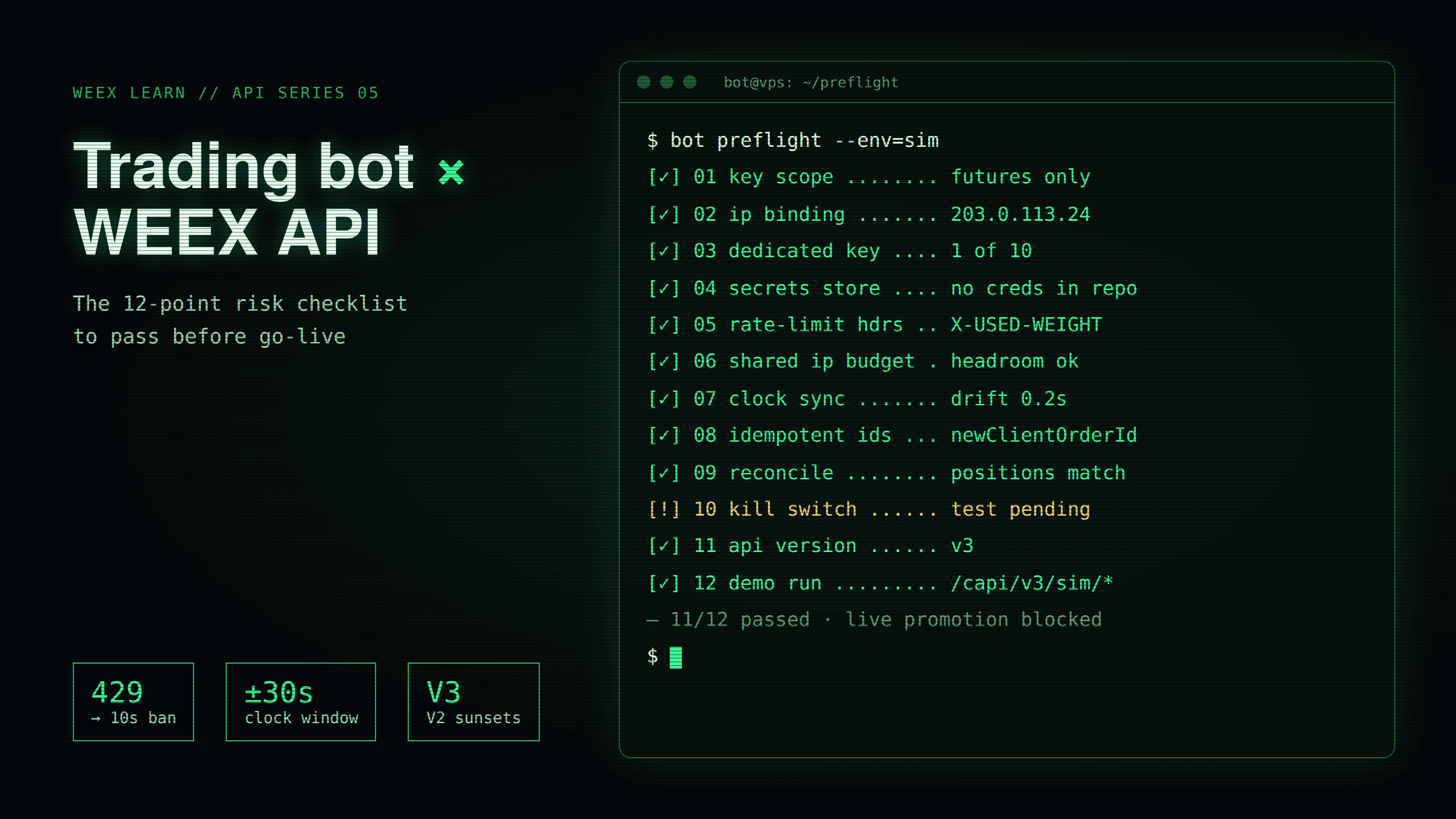
3. The key is dedicated to this bot. One key per bot, per machine, out of the 10 groups WEEX allows. When something goes wrong you will want to revoke one bot without stopping the others, and you will want order history that tells you which bot did what. Done: the key name identifies the bot and host.
4. The secret and passphrase live in a secrets store. Not in the bot's source, not in a screenshot, not in the platform's support chat. The passphrase is unrecoverable, so it is stored alongside the SecretKey. Done: a fresh clone of the bot's repository contains no credentials.
Rate-limit and clock checks (5–7)
5. The bot reads WEEX's rate-limit headers. Most REST endpoints are limited per IP by weight; order placement is limited per account under the ORDERS bucket. Exceeding either returns HTTP 429 and a 10-second ban. Responses carry X-USED-WEIGHT and X-REMAINING-WEIGHT for weighted endpoints and X-ORDER-COUNT and X-ORDER-REMAINING for order endpoints, across second, minute, hour, and day intervals. A bot that backs off when the remaining budget is low never meets the ban; a bot that retries on 429 extends it. Done: logs show the bot throttling itself before 429, and a 429 triggers a pause rather than a retry loop.
6. Several bots on one IP share one budget. Because the weight limit is per IP, three bots on the same VPS compete for the same allowance while each has its own per-account order budget only if they run under different accounts. Done: you have summed the polling rate of every process on the host and it sits inside the IP budget with headroom.
7. The host clock is synchronised. WEEX rejects requests whose timestamp is more than 30 seconds from server time. Clock drift produces intermittent authentication failures that look like key problems and, worse, can leave a bot unable to cancel orders it already placed. Done: NTP is running, and the bot fetches server time at startup and on any timestamp rejection.
Order-handling and failure checks (8–10)
8. Orders are idempotent. Every order request carries a newClientOrderId generated deterministically from the signal, so a retry after a timeout cannot double-fill. WEEX accepts client IDs of 1 to 36 characters from a restricted character set. Done: killing the bot mid-request and restarting it does not produce a duplicate order.
9. The bot reconciles against the exchange, not its own memory. After any reconnect or restart, the bot queries positions and open orders from WEEX and treats that as truth. A bot that trusts its internal ledger after a crash will hedge a position that no longer exists or leave one open that it thinks is closed. Done: a forced restart during an open position results in correct state within one polling cycle.
10. There is a kill switch you have actually tested. Two layers. Inside the bot: a maximum position size, a maximum daily loss, and a maximum order rate, each of which halts trading and cancels open orders when breached. Outside the bot: you know that deleting the API key in WEEX's API Management page stops it instantly, and you have done it once on the demo to see the bot's behaviour when its key dies. Done: both layers have been triggered deliberately and the bot stopped cleanly.
-- Price
Platform and lifecycle checks (11–12)
11. The bot speaks a current API version. WEEX's futures API documentation marks V2 as sunsetting on 30 September, with V3 current. A hosted platform or an old open-source connector that still targets V2 endpoints will stop working, potentially with positions open. Done: every endpoint the bot calls is a V3 path, or the platform has confirmed in writing that its WEEX connector is V3.
12. The whole list has passed on demo. WEEX's futures API exposes simulated endpoints, including POST /capi/v3/sim/order and GET /capi/v3/sim/balance, that use the same authentication and signing as live and settle in demo SUSDT. Run the bot there long enough to see a restart, a rate-limit warning, a stop-loss trigger, and a key revocation. Done: the bot has completed at least one full week on demo with a clean error log, and promotion to live is a configuration change from /sim/ to live paths plus a key swap, reviewed by a human.
Hosted platform or self-built: Where the risks differ
The checklist applies to both, but the weak points move.
A hosted bot platform takes the engineering items off your plate (rate limiting, reconciliation, version migration) and replaces them with counterparty risk: your key is stored on their infrastructure, and a breach there exposes every key they hold. Mitigate with IP binding to their published addresses, least scope, and a rotation whenever you stop using the platform. Ask two questions before connecting: do they publish stable outbound IPs, and is their WEEX connector on V3.
A self-built bot removes the counterparty and gives you every engineering item on the list. The items people skip are 7, 8, 9, and 10, because they only matter in failure, and the demo account is where those failures are cheap. Budget more time for the kill switch than for the strategy.
What experienced operators watch
Two patterns account for most bot blow-ups that were not strategy failures. The first is the silent retry loop: a network blip, a 429, an exponential backoff that was never implemented, and a bot that hammers the order endpoint through a 10-second ban while its stop-loss cancellation sits in the queue. The second is the stale key: a bot retired months ago whose Futures/Contract key was never deleted, still valid, still unbound. Point 5 prevents the first; point 3 plus a quarterly audit of API Management prevents the second. Neither requires any cleverness, only doing it.
FAQ
1. Is it safe to connect a trading bot to the WEEX API?
It is safe to the extent the key is scoped to one market, IP-bound, dedicated to the bot, and the bot handles rate limits, clock drift, idempotency, and reconciliation. WEEX keys cannot withdraw, which removes the worst outcome but not trading losses.
2. What API permission does a bot need on WEEX?
A spot bot needs the Spot trade scope; a futures bot needs Futures/Contract. Monitoring-only bots need Read Only. Never enable both trade scopes on one key.
3. What happens if my bot exceeds WEEX rate limits?
The API returns HTTP 429 and imposes a 10-second ban. Order endpoints are limited per account; most other endpoints are limited per IP by weight. Read the X-USED-WEIGHT and X-ORDER-COUNT headers to stay under the limit.
4. Can I test a bot on WEEX without real money?
Yes. The futures API's simulated endpoints under /capi/v3/sim/ use live authentication and settle in demo funds, and the demo terminal lets you watch the bot's orders in real time.
5. What is the WEEX API V2 sunset?
WEEX's API documentation lists V2 as sunsetting on 30 September, with V3 as the current version. Bots and platforms still targeting V2 endpoints need to migrate before then.
6. How do I stop a bot immediately?
Delete its API key in WEEX's API Management page; the bot loses access at once. Then cancel open orders and review positions manually. Build an internal kill switch as well so the bot can stop itself on a loss or size breach.
Risk Warning
Automated trading through an exchange API combines market risk with operational risk. Leveraged futures positions can be liquidated quickly, and a bot bug, network failure, rate-limit ban, clock drift, or leaked API key can place or fail to cancel orders in ways that cause losses no human would have chosen, none of which can be reversed. Third-party bot platforms add counterparty risk to your API credentials. Cryptocurrency prices are volatile and you may lose part or all of the capital a bot controls. WEEX API behaviour, limits, and version timelines are described as of September 2026 and may change; nothing here is investment advice.
This content is provided for general informational purposes only and doesn't constitute financial, investment, legal, or tax advice. Any events, rewards, online promotions, or related information mentioned herein should not be considered a recommendation, solicitation, or invitation to purchase, sell, trade, or otherwise deal in any crypto assets. Crypto assets are highly volatile and may result in loss. The availability of WEEX services, products, and related events may vary by region. You are responsible for ensuring that your participation is in accordance with applicable local laws and regulations.
You may also like
CRWV Stock Swings From -9.5% to +5.9%: Why CoreWeave Reversed

ETH Staking on WEEX vs On-Chain: Queues, Minimums, and Keys
Crypto Liquidation Price: How to Calculate It From 5x to 50x
PEP Earnings: PepsiCo Beats Q3, Cuts Guidance on North America
How Quant Trading Platforms and Bots Can Build With WEEX Broker

WIF and POPCAT Price Rally: Can the Solana Meme Rotation Hold?
ZEC Futures Trading: Leverage Lessons From Zcash's $1,400 Squeeze
SOL Perpetual Contracts: Mark Price, Index Price and Liquidation
How to Test a Trading Strategy on WEEX Demo Before Going Live
Palantir Stock 24/7: How PLTR Perpetual Futures Really Price
Oracle Stock Futures After Earnings: How Leverage Got Liquidated

AVAV Stock Futures: How to Trade AeroVironment With Leverage

Hunter Biden's LAPTOP Memecoin: What TRUMP's Trajectory Suggests Could Happen Next
Nike S&P 100 Exit: What the Removal Means for NKE Holders

Cathie Wood Robinhood Stock: What Her 2026 Trades Really Show

Nike Stock Price Prediction 2026: What the $50 Target Actually Requires to Happen

AAPL Under Ternus: What Apple's CEO Change Means for Traders
NVIDIA Stock: What the $108B Q3 Guide Means for NVDA Next
PEP Stock Analysis: Why PEPon Trades Above PepsiCo Shares
CRMON After Salesforce's 23% Post-Earnings Surge: The Catch

PKR to USDT Rate: How to Spot a Bad P2P Spread in Pakistan

SOXSB Explained: Why the 3x Chip Bear ETF Resets Without You
Is WMT Stock a Buy After Falling 23% From Its 52-Week High? What the $137 Analyst Target Actually Implies

XRP ETFs Have Pulled Nearly 1 Billion Tokens off the Market: Why the Price Keeps Sliding Anyway
JPMorgan Says Buy the Chip Dip but Morgan Stanley Says Sell: What the SOXL Analyst Disagreement Actually Means
Bitcoin's $2.7 Billion Short Squeeze: What Triggered the Largest Liquidation Event of August 2026

Crypto Exchange API: Permissions, Signing and Rate Limits
QQQB and the Fed: What the FOMC Minutes Mean for Nasdaq-100
SK Hynix Stock Is Down 35% in July: Is the Worst Finally Over?
CRWV Stock Swings From -9.5% to +5.9%: Why CoreWeave Reversed
ETH Staking on WEEX vs On-Chain: Queues, Minimums, and Keys
Crypto Liquidation Price: How to Calculate It From 5x to 50x
PEP Earnings: PepsiCo Beats Q3, Cuts Guidance on North America
How Quant Trading Platforms and Bots Can Build With WEEX Broker
WIF and POPCAT Price Rally: Can the Solana Meme Rotation Hold?
Contents
Popular coins
Latest articles


