
How to Deposit on the WEEX App (2026): Crypto and Fiat Step-by-Step Guide

 Prefer us on Google


Quick answer: To deposit on the WEEX app, open the app, tap Wallet at the bottom, then Deposit. For crypto, choose the coin and network, copy your WEEX deposit address and send funds from your other wallet. To buy crypto with local currency, choose a fiat option such as a bank card instead. WEEX does not charge a deposit fee; you only pay the sending network's fee.
Before you deposit: avoid the two costly mistakes
- Match the network. If you deposit USDT on TRC-20, the sending wallet must also send on TRC-20. A network mismatch can lose the funds.
- Add a memo or tag when shown. Coins such as XRP and some others need a memo/tag as well as the address, or the deposit will not be credited automatically.
Depositing from a computer instead? Follow the desktop deposit guide. Once funds arrive, you can withdraw them back out the same way in reverse.
How to Deposit on WEEX: Step-by-Step Guide
Depositing funds on WEEX is a straightforward process that can be done through multiple methods. Follow the steps below to complete your deposit and get started with your trading or investment journey.
Step 1: Create or Log in to Your WEEX Account
Before you can deposit, you need to have a WEEX account. If you don't already have one, follow these steps to create your account:
For Mobile Users:
- Download the WEEX app from your app store.
- Sign up using your email or phone number.
- Verify your account as per the instructions.
If you already have an account, simply log in by entering your username/email and password.
Step 2: Navigate to the Deposit Section
Once you’re logged in to your account, it’s time to deposit funds.
On the Mobile App:
- Open the WEEX app.
- Tap on the “Wallet” icon located at the bottom.
- Select “Deposit” to begin.
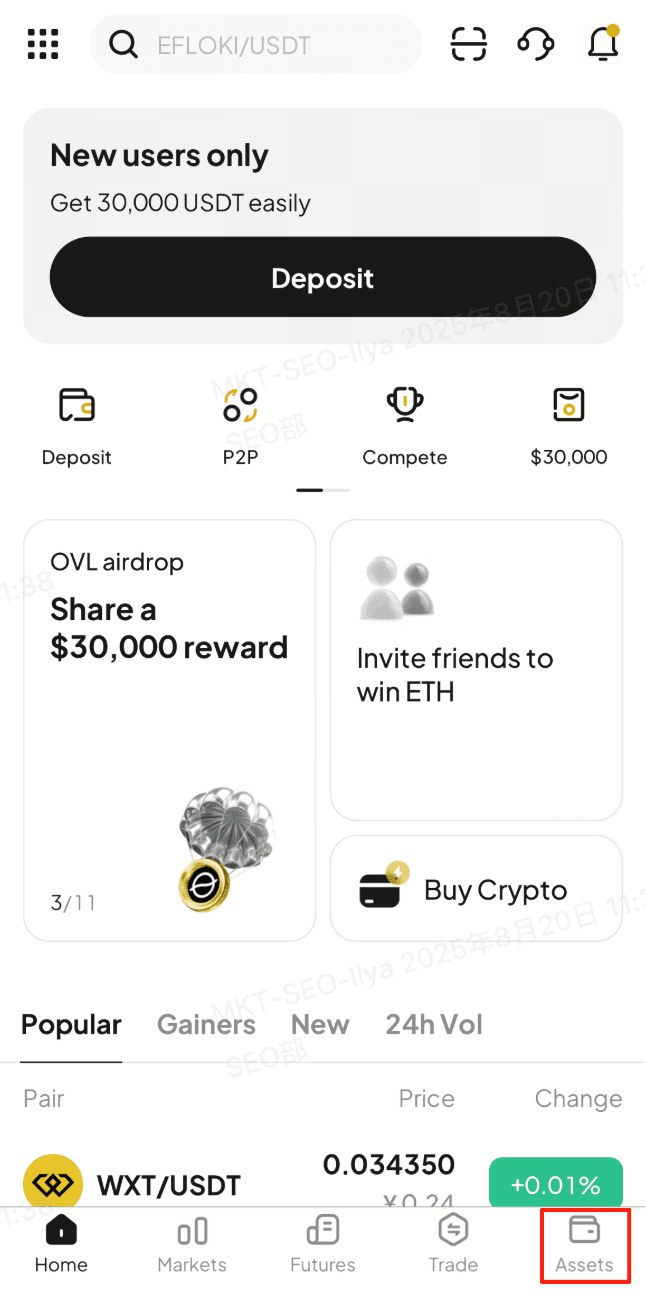
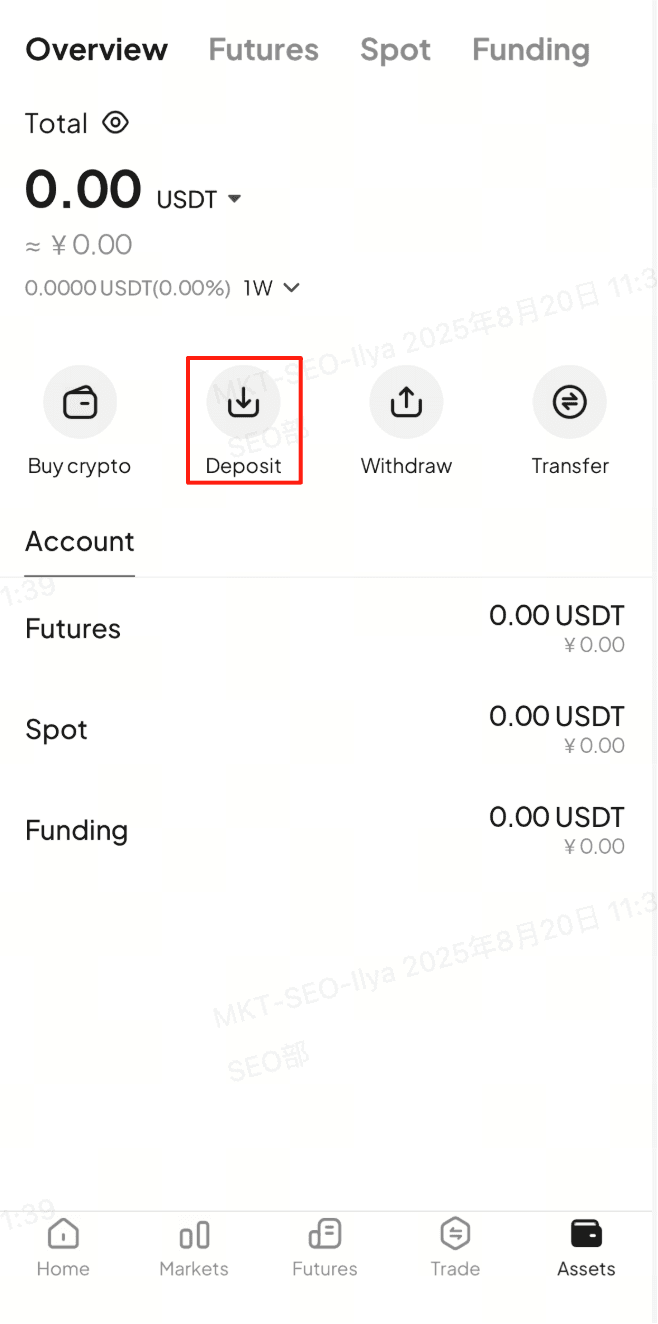
Step 3: Select Your Preferred Deposit Method
WEEX offers several deposit options, including crypto and fiat deposits. You can deposit the following:
- On-chain Deposit:
- Select Cryptocurrency: Choose the cryptocurrency you want to deposit (e.g., Bitcoin, Ethereum, USDT).
- Copy the Deposit Address: Once you select your coin, WEEX will generate a unique deposit address.
- Transfer Funds: Use your external wallet to send funds to this address. Make sure to double-check the address to avoid errors.
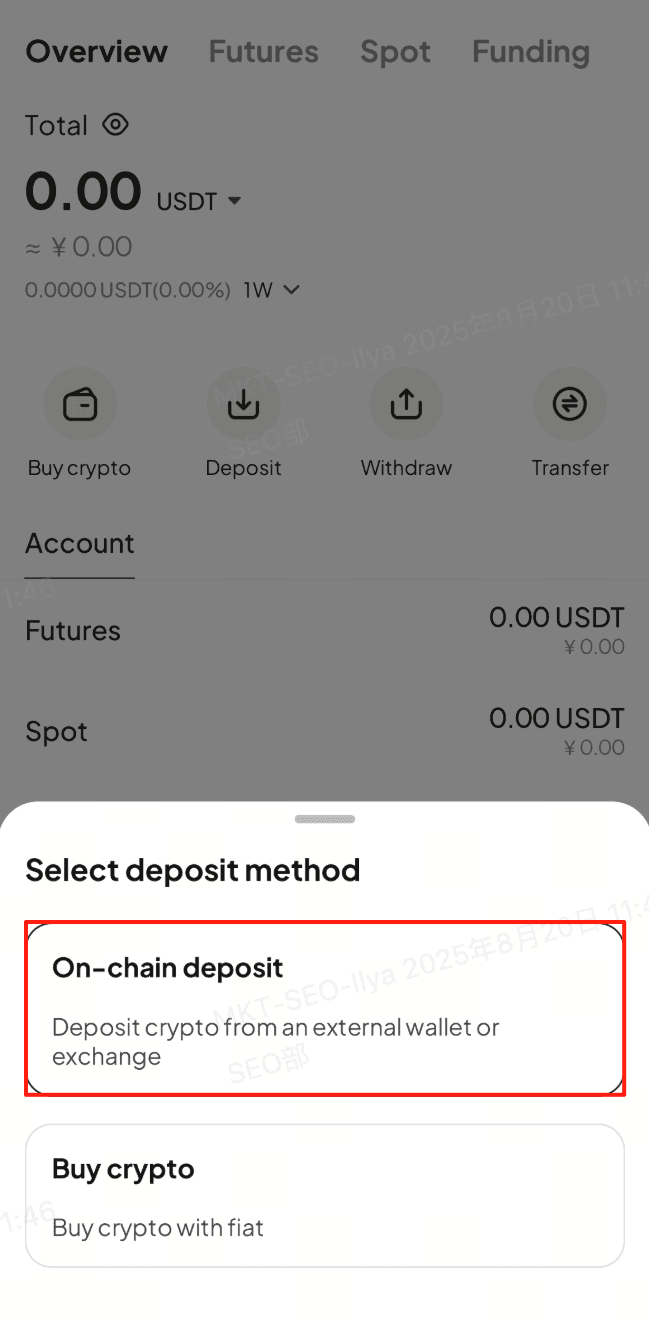
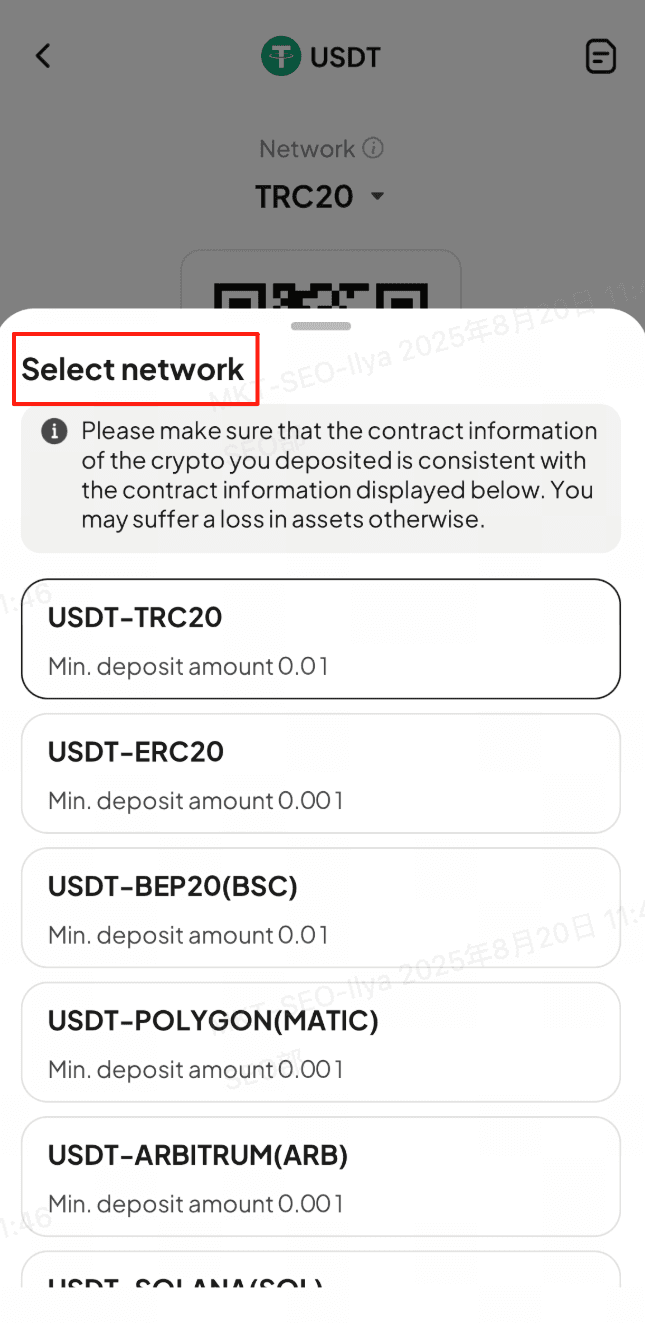
- Buy Crypto with fiat:
- Choose Your Payment Method: WEEX supports several fiat deposit methods, including bank transfers, credit/debit card payments, or third-party services (like PayPal or other local payment options).
- Enter the Amount: Input the amount you wish to deposit in your local currency.
- Confirm Payment: Follow the on-screen instructions to complete your payment via the selected method.
Step 4: Confirm the Deposit Details
Before finalizing your deposit, make sure all details are correct:
- Check the Deposit Amount: Ensure that you are depositing the correct amount of cryptocurrency or fiat.
- Confirm the Deposit Address (for crypto): Always double-check that the address provided by WEEX matches the address you’re sending funds to from your wallet.
- Transaction Fees: Some deposits, especially crypto, may come with network fees, so make sure to account for those when transferring funds.
Step 5: Wait for Confirmation and Deposit Completion
After confirming your deposit details:
- Crypto Deposits: Blockchain transactions can take anywhere from a few minutes to several hours, depending on network congestion. You can track the status of your deposit in the Transaction History section of your WEEX account.
- Fiat Deposits: Depending on the payment method, fiat deposits are typically processed immediately or within a few business days.
Additional Tips for Depositing on WEEX
- Minimum Deposit: Ensure you meet the minimum deposit requirements for the cryptocurrency or fiat method you are using. These limits may vary.
- Transaction Speed: Crypto deposits can take longer due to blockchain network congestion. Always allow extra time for your deposit to reflect in your account.
- Fees: While WEEX itself does not charge deposit fees, network or third-party service fees may apply, especially for crypto transactions.
- Security: Double-check deposit details, such as the wallet address, to avoid sending funds to the wrong destination.
Why Deposit on WEEX?
- Zero Fees for Many Transactions: Many features, such as the We-Launch event, allow users to deposit and earn rewards with no transaction fees.
- Access to Promising Projects: Participating in WEEX events like We-Launch gives you the opportunity to commit WXT tokens and earn airdrop rewards from high-quality crypto projects.
- Wide Range of Crypto Assets: WEEX supports a wide range of cryptocurrencies, making it easier for users to diversify their portfolios.
- Secure Transactions: WEEX ensures all deposits and withdrawals are processed with the highest level of security.
FAQ
How long does a WEEX deposit take?
Crypto deposits are credited after the required number of network confirmations, usually a few minutes on fast networks and longer for BTC or during congestion.
Does WEEX charge deposit fees?
No. WEEX does not charge for crypto deposits; only the sending network's fee applies.
My deposit has not arrived. What should I do?
Check the transaction on a block explorer to confirm it was sent to the right address and network. If it is confirmed on-chain but not credited, contact WEEX support with the transaction hash.
Further Reading
- How to Buy/Sell Cryptocurrency on WEEX: A Step-by-Step Guide
- The Complete Guide to WEEX WXT: Explore WEEX Coin and Its Potential in 2025
- What Is WEEX - An Overall WEEX Exchange Review
-- Price
This content is provided for general informational purposes only and doesn't constitute financial, investment, legal, or tax advice. Any events, rewards, online promotions, or related information mentioned herein should not be considered a recommendation, solicitation, or invitation to purchase, sell, trade, or otherwise deal in any crypto assets. Crypto assets are highly volatile and may result in loss. The availability of WEEX services, products, and related events may vary by region. You are responsible for ensuring that your participation is in accordance with applicable local laws and regulations.
You may also like
View moreStrategy Stock Fell 30%: What the Nov. 30 MSCI Exit Means for MSTR
Beginner3 minTradingAMZN Stock Up 3.8%, Then Down 3.9%: Is the AWS AI News Priced In?
Beginner5 minTradingAnthropic Stock After Day One: Why ANT Tokens Trade Near $92
Beginner3 minTradingGOOGL Q3 Earnings: Why Alphabet Fell Despite 103% Cloud Growth
Beginner5 minTradingWEEX Trading Pair Suspended or Delisted? Your Orders and Assets
Beginner4 minWEEX Product GuideWEEX Limit Order Not Filled? Read the Book, Then Fix the Order
Beginner4 minTrading


