
OneKey Founder Warns About Storing Seed Phrases on Old iPhones

 Prefer us on Google


Not Always Safe Offline: Highlighting BootROM Vulnerabilities
The founder of OneKey, a cryptocurrency hardware wallet company, Yishi Wang, has warned against storing seed phrases on old iPhones.
Over the past two weeks, iPhones have been publicly jailbroken more than once, and most people treated it as a bit of tech drama and scrolled on. I want to use it to talk about something that matters more to people in crypto: wiping an old iPhone, putting it in airplane mode and using it only to hold your seed phrase is not as safe as most people think. If it's an iPhone 11 or older, the problem lives in the chip, and no iOS update will fix it. Quick recap of what happened. On October 16 at Hexacon in Paris, the Calif team jailbroke an iPhone 18 Pro running iOS 27.0.1 live on stage. The jailbreak survived a reboot, they had root, and they got past MIE, the hardware memory protection Apple added starting with the A19 specifically to stop spyware. In the same session they showed attacks that get in through a single click in Signal or iMessage. A week later, on the day iPhone Duo went on sale, they jailbroke that too. Apple shipped iOS 27.2 on October 26, and Calif says most of the bugs they used are now fixed. Then on October 30, Ikotas Labs, the Japanese team that just won Pwn2Own, posted that they had jailbroken 27.2 as well. Their video only shows swapped icons and the version number, though, so I'm treating it as unconfirmed for now. For most people on a recent phone who keep it updated, none of this is a reason to panic. Before chains like these get patched, they usually sit with spyware vendors and forensics companies, and the odds of an ordinary person being specifically targeted are low. Update to 27.2 and you've done what you need to. The people I actually want to warn are those using an old iPhone as a cold wallet. iPhone 4S through iPhone X have checkm8 in the BootROM, made public in 2019. This June, usbliter8 went public, covering the iPhone XS, XR, the 11 series and the 2nd-gen SE. The BootROM is boot code burned into the chip at the factory. Apple can't patch it with a software update, so these devices will carry the hole for as long as they exist. Exploiting it doesn't need a network either. Once someone has your phone in hand, they put it into DFU mode and plug in a custom USB board (the public research used a $5 Raspberry Pi Pico 2), and they can run their own code before iOS even boots. Airplane mode makes no difference here. I don't want to overstate it. On models like the XS and 11, the BootROM bug alone won't hand over your seed phrase, because your passcode and the Secure Enclave are still in the way. The trouble is that these remaining layers are exactly where people tend to cut corners: a 6-digit passcode, an iOS version years out of date with a pile of public n-days, a short wallet app password. On some older models, forensic tools use bugs like this to brute-force the passcode. And if your wallet app encrypts the seed with nothing but a short password, once that encrypted file is copied off, the attacker can take it home and keep guessing offline, with no attempt limit. Old iOS versions also have a charging port problem. ChoiceJacking, published in 2025, lets a malicious charger pose as a keyboard and approve the data-access prompt for you. Apple only closed that in iOS 18.4. One more thing about this kind of attack: when you get your phone back, nothing looks off. In security circles it's called an evil maid attack. A hotel room, a security check, lending your phone to someone to charge --- any time it's out of your hands for a while, there's an opening. A lot of people only find out their phone was touched after their assets are already gone. My advice: 1. Check which iPhone holds your seed phrase (Settings → General → About). If it's an iPhone 11 or older, move to a newer model before storing a seed on it. 2. If you've already stored one there, no need to panic. When you get a chance, generate a brand-new seed phrase in an environment you trust and move your assets over. It has to be a whole new seed. A fresh add
- Using an old seed won't help. 2. If your phone has ever been out of your hands for a while, such as being held for inspection at a border, don't wait. Migrate as in step 2 as soon as you can. 3. Update your daily iPhone to iOS 27.2 (Settings → General → Software Update). If you haven't moved to 27 yet, install at least 26.7.2. 4. Switch to a long alphanumeric passcode (Settings → Face ID & Passcode → Change Passcode → Passcode Options). A 6-digit PIN has only a million possible combinations. Make your wallet app password longer too. 5. Carry your own charger. Don't use public USB ports, random power banks, or cables you don't know. 6. If you hold a lot or are likely to be targeted, consider turning on Lockdown Mode (Settings → Privacy & Security → Lockdown Mode). It blocks wired connections while the phone is locked. 7. Any "iOS 27 jailbreak download," or any tutorial asking you to install a certificate or configuration profile, is a scam or malware. Neither Calif nor Ikotas has released any tools. If you like using an iPhone as a cold wallet, go with a newer model and keep it on the latest iOS. There's no public BootROM exploit for the iPhone 12 or later, and if something does turn up, Apple can still fix it with an update. With really old devices, the risk sits in the chip itself, and updating iOS won't get you around it.
--- Yishi (@ohyishi) October 31, 2026
Japanese Translation:
In the past two weeks, the iPhone has been publicly jailbroken multiple times, but most people treated it as a minor drama in the tech world and scrolled past. I took this opportunity to highlight a more significant concern for the cryptocurrency community...
Due to vulnerabilities that cannot be fixed with software updates, devices that are disconnected from the internet may still be susceptible to attacks. On October 31, the individual pointed out the dangers of using old iPhones as cold wallets for cryptocurrencies in a post on X. The method of initializing an old smartphone and disconnecting it from the network to store seed phrases is utilized among cryptocurrency holders who prioritize self-management.
However, if an attacker can physically access the device in an offline environment, security may be compromised. The cause is a vulnerability in the BootROM, which stores the instructions executed first when the device boots up. This code is permanently written to the processor, making it unfixable through regular iOS updates.
The "checkm8" exploit released in 2019 affects models from the iPhone 4S to the iPhone X, while "usbliter8," released in June 2026, targets the A12 and A13 processors found in the iPhone XS, XR, iPhone 11 series, and the second-generation iPhone SE.
While exploiting these vulnerabilities requires physical access and specialized equipment, attackers could potentially hijack the boot process via USB and execute malicious code before iOS loads. Since this does not require a network connection, simply switching to airplane mode or initializing the device does not guarantee safety.
New Seed Phrase Generation and Asset Transfer Recommended
On the other hand, even with the BootROM vulnerability, seed phrases do not automatically leak. Device encryption, passcodes, and Apple’s Secure Enclave function as barriers to protect stored information.
However, short numeric passcodes or weak wallet passwords can weaken defenses. In particular, encrypted wallet files protected only by weak app passwords could be attacked offline if extracted. There are also concerns about "evil maid" attacks, where devices left in hotel rooms could be tampered with without the owner's knowledge.
Wang recommends users of affected devices generate entirely new seed phrases in a trusted environment and transfer their assets to a new wallet. Creating another address from an existing seed phrase does not eliminate the fundamental risk if the original phrase has leaked. He also suggested updating the OS, setting a strong alphanumeric passcode, avoiding unknown USB devices or chargers, and considering lockdown mode.
For iPhones from the 12 series onward, no impact from the two BootROM vulnerabilities identified this time has been confirmed. However, Wang believes that when storing significant assets long-term, even the latest iPhones should not be treated as equivalent to dedicated hardware wallets.
-- Price
This content is provided for general informational purposes only and doesn't constitute financial, investment, legal, or tax advice. Any events, rewards, online promotions, or related information mentioned herein should not be considered a recommendation, solicitation, or invitation to purchase, sell, trade, or otherwise deal in any crypto assets. Crypto assets are highly volatile and may result in loss. The availability of WEEX services, products, and related events may vary by region. You are responsible for ensuring that your participation is in accordance with applicable local laws and regulations.
You may also like
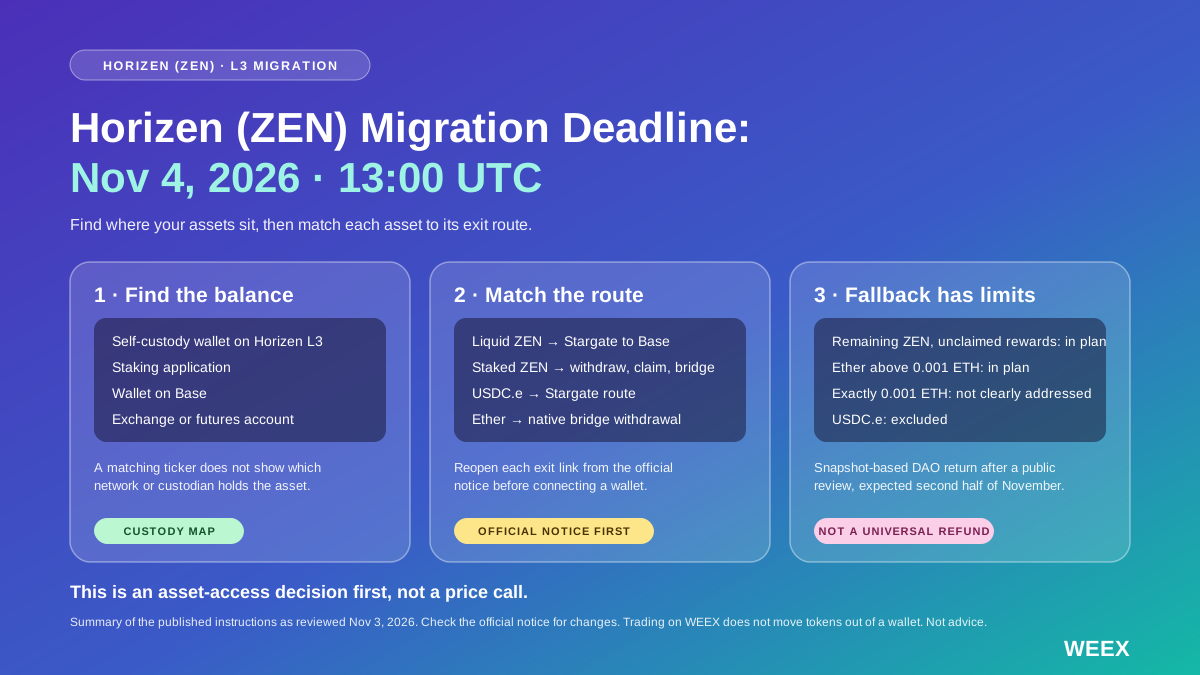
Horizen (ZEN) Migration Deadline: What to Move Before November 4 and What Happens If You Miss It
Horizen (ZEN) migration closes November 4. Check asset-specific bridge routes, wallet requirements, recovery exclusions and what to do if you miss it.
Fake Demand, Real Losses: How Popular Crypto Schemes Work

A Hole Punctured by a Dealer: A $100 Liability Cap Cannot Cover a $90 Million Loss
After FomoPeek Theft: You Need This New Private Key Security Guide!
Fake AI trading bot tutorials steal 274.6 ETH from 224 victims
A Practical Guide to FOMO: How to Find People and Coins in Social Trading?
Cybersecurity Events: USB Worm Targets Crypto Wallets, Apple Closes Hole in Beats Studio Buds
SDE ep. 41: Bitcoin Self-Custody After ColdCard

Dan Koe: The Counterintuitive Truth That You Don't Need to Remember Everything You've Read

BNB Chain sues ex-employee over $628K memecoin trade

Popular Interaction Collection | Axis Robotics 'Zero-Roll' Task; Orbinum Testnet Experience (July 30)

I tested with $10,000: zero wear and tear, annualized 8%, and can earn points (with complete tutorial + screenshots)

Crypto Regulation News Update 2026: CLARITY Act, SEC-CFTC Framework, and 1099-DA Cost Basis Reporting Goes Live
Latest crypto regulation news April 2026: CLARITY Act stalled over stablecoin yield, Senate window closing. IRS Form 1099-DA cost basis reporting now mandatory. SEC-CFTC taxonomy guide. Actionable compliance insights.

Crypto Tax Deadline 2026: How to Generate 2026 Crypto Tax Reports (WEEX & KoinX Fast Tutorial)
Still filing crypto taxes close to the 2026 deadline? Follow this step-by-step WEEX Tax API + KoinX workflow to export data and generate an accurate crypto tax report quickly.

The Cryptographic Past of the Middle East
WEEX-OTC trading launches OSL payment channel
WEEX has officially launched our Quick Buy feature and added OSL Pay channel to help make fiat deposits more convenient and accessible.

BitMine Reports 6.06M ETH Holdings, With More Than 5.22M Staked

Strategy Adds 811 Bitcoin and Repurchases $208.2M of STRC Shares
Crypto Docs Host GitBook Hit by AI Agent Security Breach, Urges Users to Rotate Keys

Jesús de Miguel memecoins draw backlash after striker’s death

"Bitcoin will drop to zero". Billionaire believes Satoshi's wallets will be emptied, and the hacker will profit double

Dollar in 2027: Estimated Shortfall of $15 Billion to Pay Debt in a Stress Scenario
Zcash details seven Zebra security fixes ahead of NU7 upgrade

Jim Cramer and Bitcoin: A Misleading Signal?
Has Wall Street Broken the Mechanism That Made Bitcoin Soar?
Binance hacker moves $798K in SOL into Privacy Cash
Anthropic Secures Its AI Claude with Zcash Crypto Technology
Binance bStocks leads tokenized stocks with $1.4B in value
Democratic Congress Kills CLARITY Act For Two Years: Analyst

Solana’s Yakovenko calls phishing crypto’s biggest threat
Horizen (ZEN) Migration Deadline: What to Move Before November 4 and What Happens If You Miss It
Horizen (ZEN) migration closes November 4. Check asset-specific bridge routes, wallet requirements, recovery exclusions and what to do if you miss it.
Fake Demand, Real Losses: How Popular Crypto Schemes Work
A Hole Punctured by a Dealer: A $100 Liability Cap Cannot Cover a $90 Million Loss
After FomoPeek Theft: You Need This New Private Key Security Guide!
Fake AI trading bot tutorials steal 274.6 ETH from 224 victims
A Practical Guide to FOMO: How to Find People and Coins in Social Trading?
Contents
Latest articles


Latest coin listings on WEEX


