


How to easily swap crypto with WEEX Convert
Crypto markets move fast, and being able to rebalance your holdings quickly can help you respond to changing market conditions. WEEX Convert makes it easier to swap and manage your assets, with a simpler process and lower costs.
WEEX Convert is now available with zero conversion fees, clear quotes, and support for small-amount swaps. Convert BTC, ETH, USDT, SOL, WXT, and many other popular assets quickly and easily.
Zero fees, easy and flexible conversions
- Zero conversion fees with clear quotes: Pay no conversion fees and review the conversion rate, amount you'll pay, and estimated amount you'll receive before confirming.
- A simple way to swap assets: Choose the asset you want to pay with and the one you want to receive, enter an amount, receive the quote, and confirm.
- Convert small balances with ease: As long as you meet the minimum conversion amount, you can put smaller balances in your account to better use.
- Complete records for every conversion: Check the conversion time, amount paid, amount received, execution price, and order status whenever you need.
WEEX Convert brings asset selection, amount entry, quote review, and conversion results into one simple flow. Before confirming, you can review the conversion rate, amount you'll pay, and estimated amount you'll receive, so you always know what to expect.
With zero conversion fees and support for eligible small-amount swaps, WEEX Convert works well for both everyday conversions and making better use of smaller account balances. Once a conversion is complete, you can view the details in Convert history and easily track each transaction.
How to use WEEX Convert
WEEX Convert lets you swap assets quickly with zero conversion fees and clear, real-time quotes. Whether you're rebalancing your portfolio or putting small account balances to use, you can convert based on the latest available quote.
Try WEEX Convert now and convert at the quoted rate without waiting for an order to fill.
Web
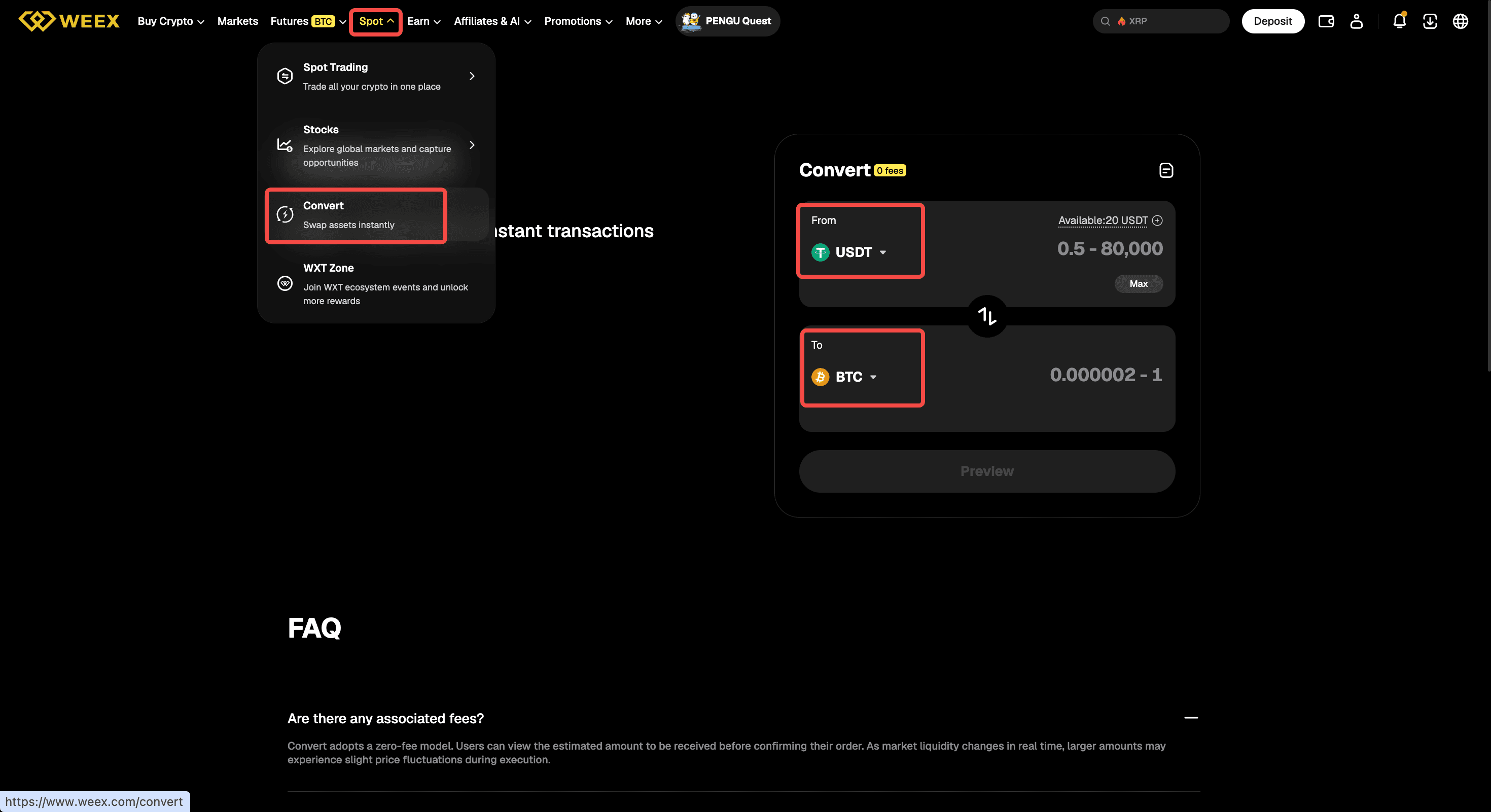
Step 1: Open Convert and choose your assets
Log in to the WEEX website and go to "Spot" > "Convert." Choose the asset you want to convert from under "From," then select the asset you want to receive under "To." To reverse the direction, use the switch icon between the two fields.
Use "Select account" to choose which account(s) to use for the conversion. By default, WEEX Convert uses available assets from both your spot account and funding account. You can deselect your funding account and use only the spot account. Your funding account cannot currently be used on its own.
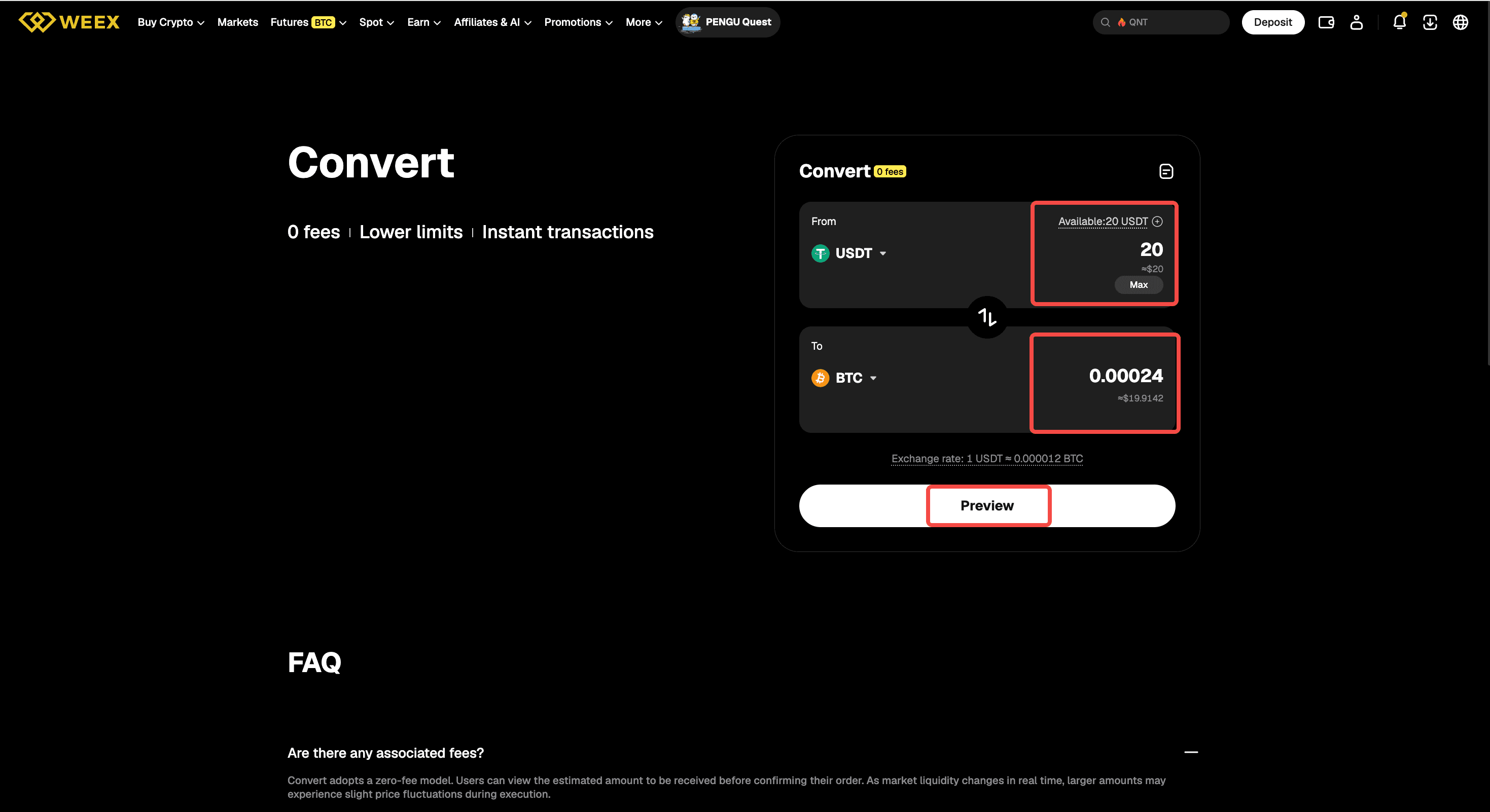
Step 2: Enter an amount and review the quote
Enter the amount you want to convert. The estimated amount you'll receive will appear automatically, along with your available balance and the applicable conversion limits. To use the maximum amount currently available, select "Max." Then select "Preview" to review the assets, amounts, conversion rate, source account, and fee details before continuing.
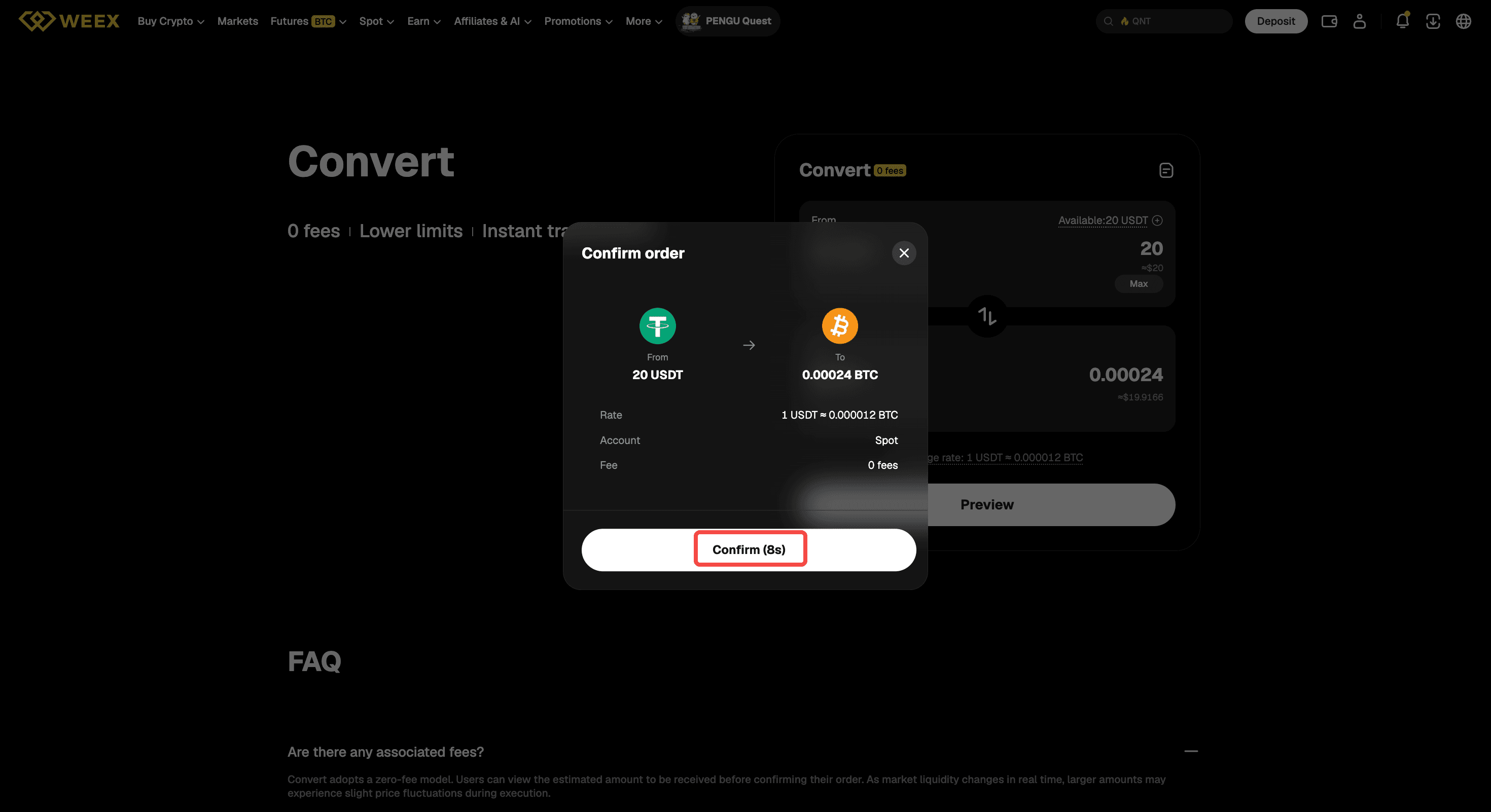
Step 3: Confirm and check the result
Quotes are usually valid for 8 seconds. Select "Confirm" before the quote expires. If it expires, select "Refresh" to get a new quote and review the updated details before confirming.
After the conversion is complete, you can check the result on the page or open Convert history from the top-right corner.
App
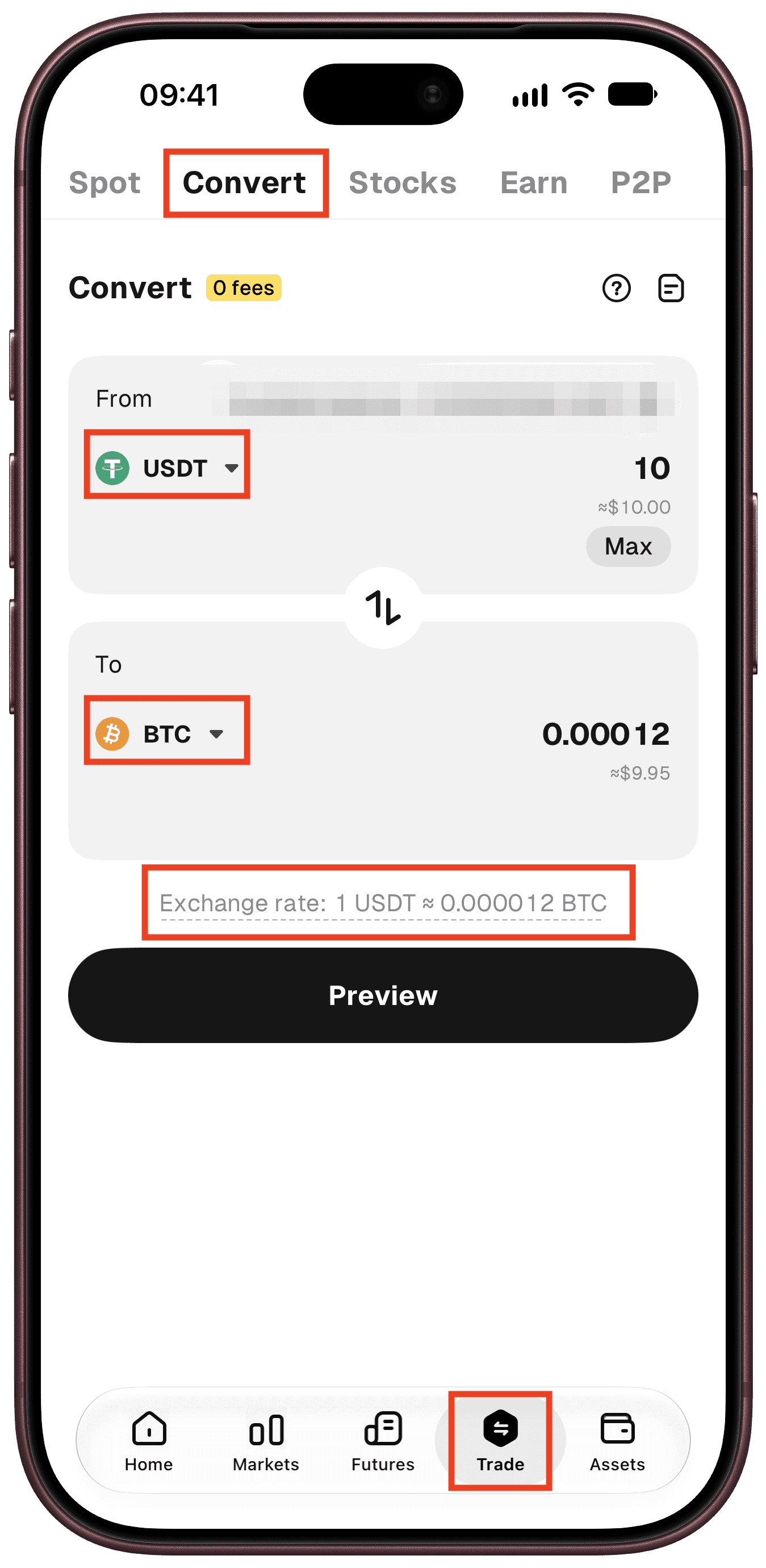
Step 1: Open Convert and choose your assets
Open the WEEX app, log in, and go to "Trade" > "Convert." Choose the asset you want to convert from under "From," then select the asset you want to receive under "To." To reverse the direction, use the switch icon between the two fields.
Step 2: Enter an amount and review the quote
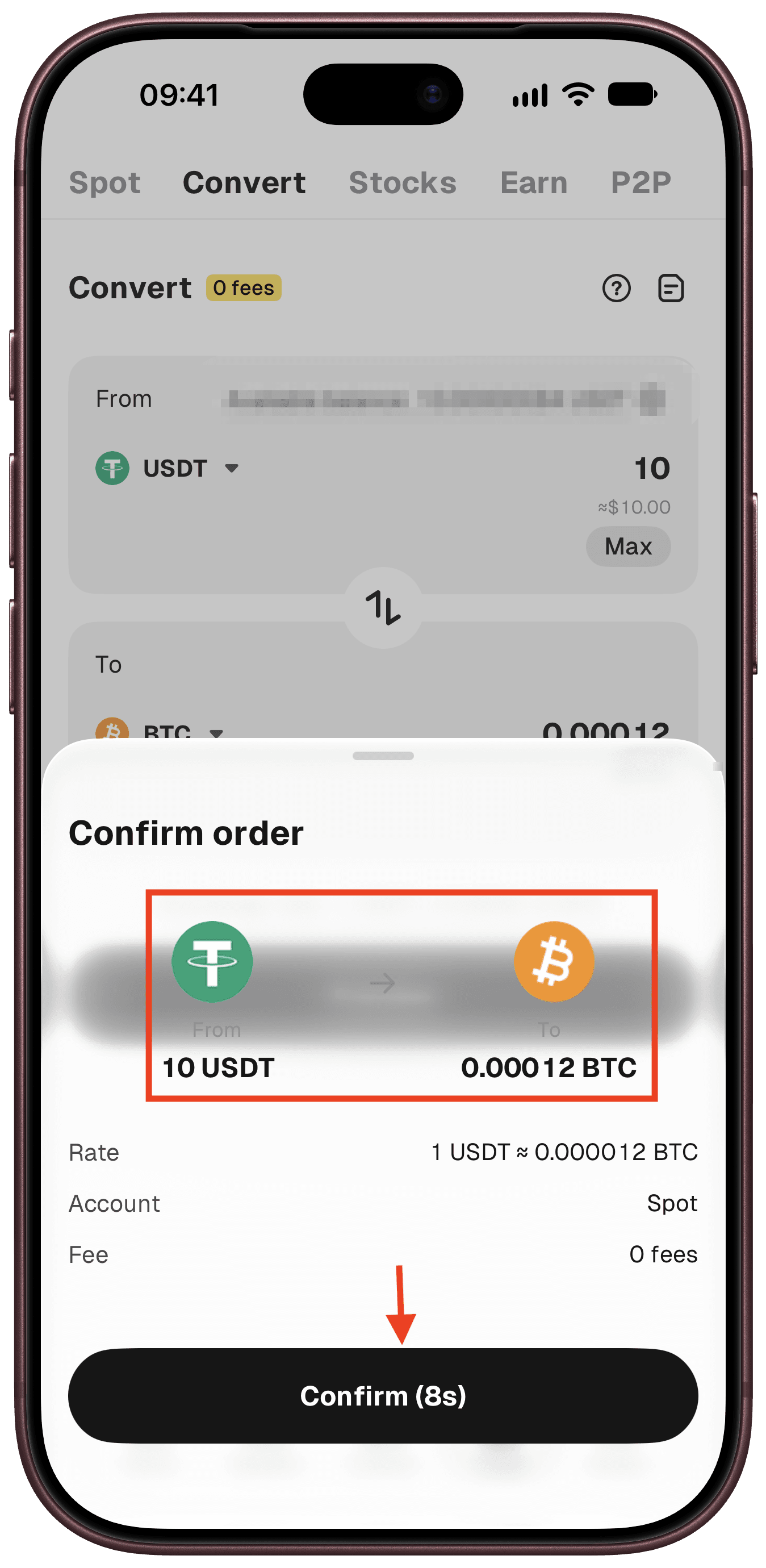
Enter the amount you want to convert. The estimated amount you'll receive will appear automatically, along with your available balance and the applicable conversion limits. Select "Max" to automatically enter the largest amount available based on your balance and the maximum allowed per conversion. Then select "Preview" to review the assets, amounts, conversion rate, source account, and fee details before continuing.
Step 3: Confirm and check the result
Quotes are usually valid for 8 seconds. Select "Confirm" before the quote expires. If the quote has expired, refresh it and review the latest details before confirming.
After the conversion is complete, you can check the result on the page or open Convert history from the top-right corner.
Things to know before using WEEX Convert
- Supported assets and minimum and maximum conversion amounts may vary. Check the Convert page for the limits that apply to your selected assets.
- WEEX Convert does not charge conversion fees. The quoted conversion rate may differ from the spot market price, so review the rate and estimated amount you'll receive before confirming.
- Quotes are usually valid for eight seconds. If a quote expires, refresh it and review the latest conversion details before confirming.
- A conversion may fail because of market volatility, an expired quote, insufficient balance, account restrictions, or other issues. If the conversion fails, your assets will not be deducted.
- If a conversion is still processing, do not submit it again. Check Convert history for the latest status. If the status does not update for an extended period, or your balance appears incorrect, contact WEEX customer support.
WEEX Convert FAQs
- Does WEEX Convert charge any fees?
WEEX Convert charges no conversion fees. Before confirming, you can review the conversion rate and estimated amount you'll receive.
Conversion rates may differ from spot market prices. Refer to the quote shown on the Convert page for the rate that applies to your conversion.
- Which accounts can I use for a conversion?
By default, WEEX Convert uses available assets from both your spot account and funding account. You can deselect your funding account and use only the spot account. Using only your funding account is not currently supported.
- Why can't I convert the amount I entered?
Each asset pair has minimum and maximum conversion limits, which may change with market prices. If your amount falls outside the available range, adjust it or try a different asset pair.
- Why is the Convert rate different from the spot market price, and how long is a quote valid?
Convert quotes are based on current market conditions, the conversion amount, and other pricing factors, so the conversion rate may differ from the spot market price and change as the market moves. Quotes are usually valid for eight seconds. If a quote expires, refresh it and review the latest rate and estimated amount before confirming.
- Why did my conversion fail? Will any assets be deducted?
A conversion may fail due to insufficient balance, an expired quote, sharp market movements, an amount outside the supported range, account restrictions, or other issues.
If the conversion fails, no assets will be deducted. If the order is still processing, avoid submitting another conversion until the status updates. If it remains unchanged for an extended period, contact WEEX customer support.
- Where can I check my conversion history?
Once a conversion is complete, the result will be shown on the page. You can also open Convert history from the top-right corner of the Convert page to check the amount paid, amount received, execution price, and status for each conversion, or select a record for more details.

Gainers


