


What Is WEEX? A 2026 Complete Exchange Review and Step-by-Step Guide
WEEX is a centralized crypto exchange offering spot trading, perpetual futures, copy trading, and programs built around its WXT token. This WEEX exchange review explains what those services do and how to use them: creating an account, depositing and withdrawing crypto, placing spot and futures orders, setting up copy trading, joining WE-Launch, and using referral or affiliate tools. It also covers fees, VIP levels, security disclosures, and the checks to make before using each service.
Our assessment is that WEEX’s breadth is useful only when a user understands the particular workflow they intend to use. A simple spot purchase, a leveraged futures position, and a copied trade have different execution rules and risks. The older version of this guide described those features in detail, but some of its fixed figures and instructions have since changed. The steps below follow the relevant WEEX guides, with links to the original instructions at the point where you may need more detail.
What This Guide Covers
- How to register, check identity-verification requirements, and secure an account.
- How to deposit, buy or sell spot crypto, place futures orders, and withdraw.
- How to configure copy trading and review its results.
- How WXT, WE-Launch, referrals, affiliates, fees, and VIP levels work.
- What WEEX’s security pages and user reviews can—and cannot—establish.
What Is WEEX Exchange, and Which Services Does It Offer?
WEEX is a centralized exchange launched in 2018. Its platform brings together trading markets and account services, but each product has its own rules. The main services discussed in this review are:
| Service | What You Can Do | Main Point to Check |
|---|---|---|
| Spot trading | Buy or sell an available asset through a trading pair | Pair availability, order book, fee, and withdrawal network |
| Perpetual futures | Open long or short contract positions using margin | Leverage, funding, liquidation, and position settings |
| Copy trading | Follow eligible trades from an Elite Trader | Your allocation, copied execution, and risk controls |
| WE-Launch | Join eligible WXT-holder reward events | Each event’s dates and average WXT holding requirement |
| Referral Program | Invite users through your link or code | Attribution and current reward rules |
| Affiliate Program | Apply for partner tools and eligible commissions | Approval, qualifying activity, and commission terms |
| VIP Program | Qualify for tier-based fees and benefits | Your actual level and the rate displayed for your account |
An asset being listed on WEEX does not mean every product supports it. A token may have a spot market but no corresponding futures contract, or it may use only certain deposit and withdrawal networks. Search for the specific asset and product you want rather than relying on an old total for cryptocurrencies or trading pairs.
Before creating an account, check whether you are eligible to use the platform from your location. The current WEEX Terms of Use list excluded jurisdictions, including the United States and its territories. Access to a public website or app-store listing does not replace that check.
How Do You Sign Up and Complete WEEX Identity Verification?
The original article began with account setup. That remains the right first step, but verification requirements should be checked in the current account flow rather than described as one fixed rule for all users. WEEX’s KYC rules say identity verification may be required.
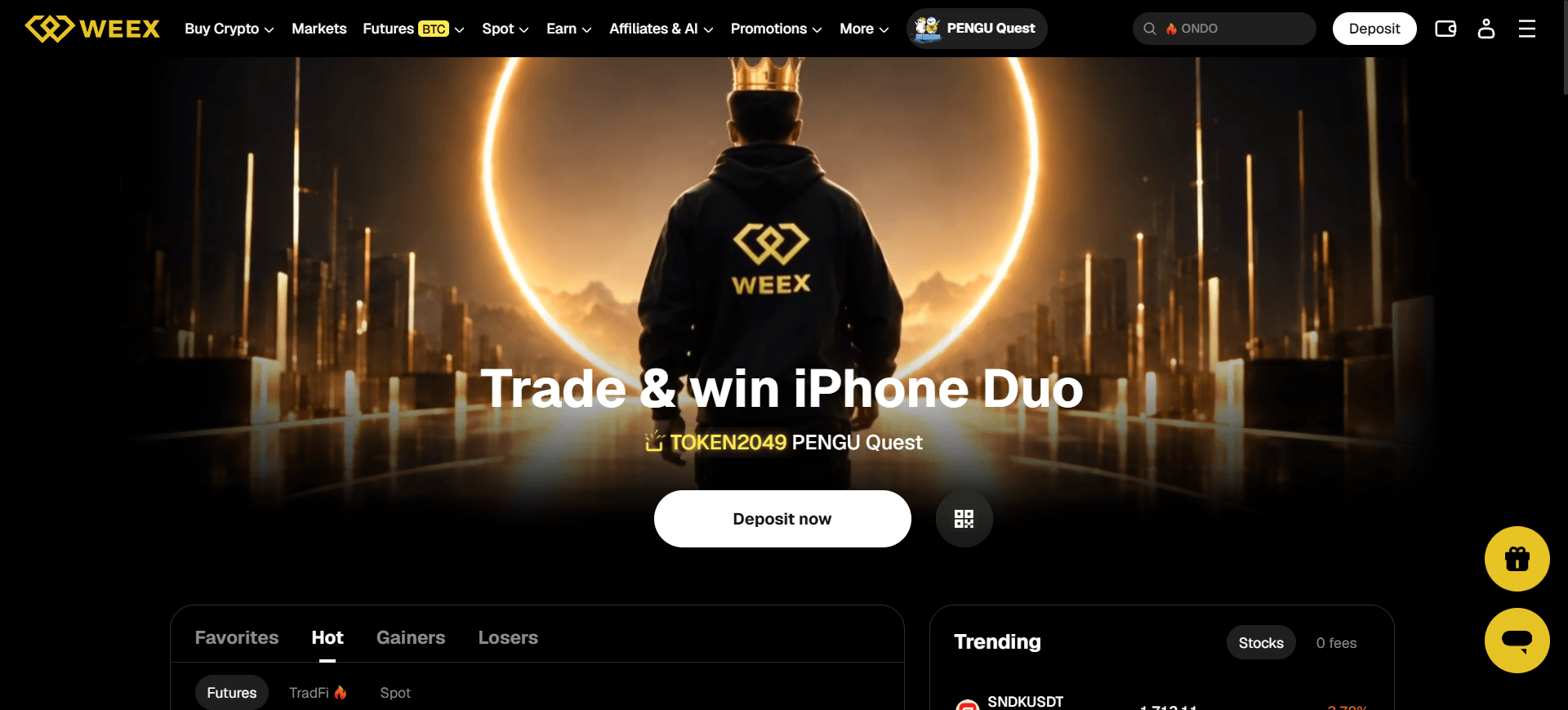
Step 1: Open an official WEEX entry point. Type weex.com into your browser or follow the download destination from WEEX’s official site. If someone sends you an unfamiliar registration link, check it through WEEX Official Verification before entering information.
Step 2: Select Sign Up. Enter the email address or phone number requested by the registration page and follow its verification prompts. Create the required password. If you intend to use a friend’s referral invitation, make sure the correct link or code is present during registration; an invitation may not be attributed afterward.
Step 3: Log In and secure the account. Complete the account-security options offered in your settings before depositing. Keep passwords, verification codes, and recovery information private. WEEX’s app setup guide explains how to obtain the app through official channels and check the listing before installation.
Step 4: Check Identity Verification. Open the identity-verification section shown in your account and review the requested documents, status, and any applicable service or withdrawal limits. Submit accurate information through the official interface if verification is required. Do not send identity documents to an unsolicited social-media account claiming to be customer support.
Step 5: Check your intended product’s eligibility. Being able to log in does not establish that every trading product or withdrawal amount is available to your account. Review any additional requirements displayed before using futures, copy trading, a payment provider, or an event.
If verification fails or remains under review, read the message in your account and contact official support with the relevant status. Avoid assuming that the position of a yellow profile icon in an older screenshot matches the latest web or app layout.
How Do You Deposit Crypto Into WEEX?
Depositing crypto is a transfer from another wallet or platform to a deposit address provided by WEEX. The asset and network must both match. WEEX’s deposit safety guide gives more detail about wrong-chain and wrong-token transfers.
If you already have crypto assets:
Step 1: Sign In and open Deposit. In your WEEX account, go to the Assets area and choose Deposit. Menu placement may differ between web and app versions.
Step 2: Select the cryptocurrency. Choose the exact asset you plan to send. If you have USDT, for example, choose USDT rather than another token with a similar name.
Step 3: Select the deposit network. Check the networks WEEX currently supports for that asset. Then open the sending wallet or exchange and select the same network there. Do not select a network solely because it has the lowest displayed transfer fee.
Step 4: Check the address and any memo or tag. Copy the deposit address from the current WEEX deposit page or use its QR code. For an asset or network requiring a memo or tag, include it exactly as instructed. WEEX explains when a memo or tag is needed.
Step 5: Review and send the transfer. Recheck the asset, network, address, memo or tag, and amount on the sending platform before confirming. Retain its transaction ID or hash.
Step 6: Confirm receipt. Check your WEEX deposit history and relevant balance. If the transfer has enough network confirmations but has not appeared, use WEEX’s delayed-deposit checklist to compare the transaction record against the asset, address, and network shown in WEEX.
A crypto deposit can be straightforward, but an incorrect network or missing required memo may prevent normal crediting. The older article’s general statement that “deposits are free” should also not be confused with a sending platform’s network fee or a third-party fiat payment charge.

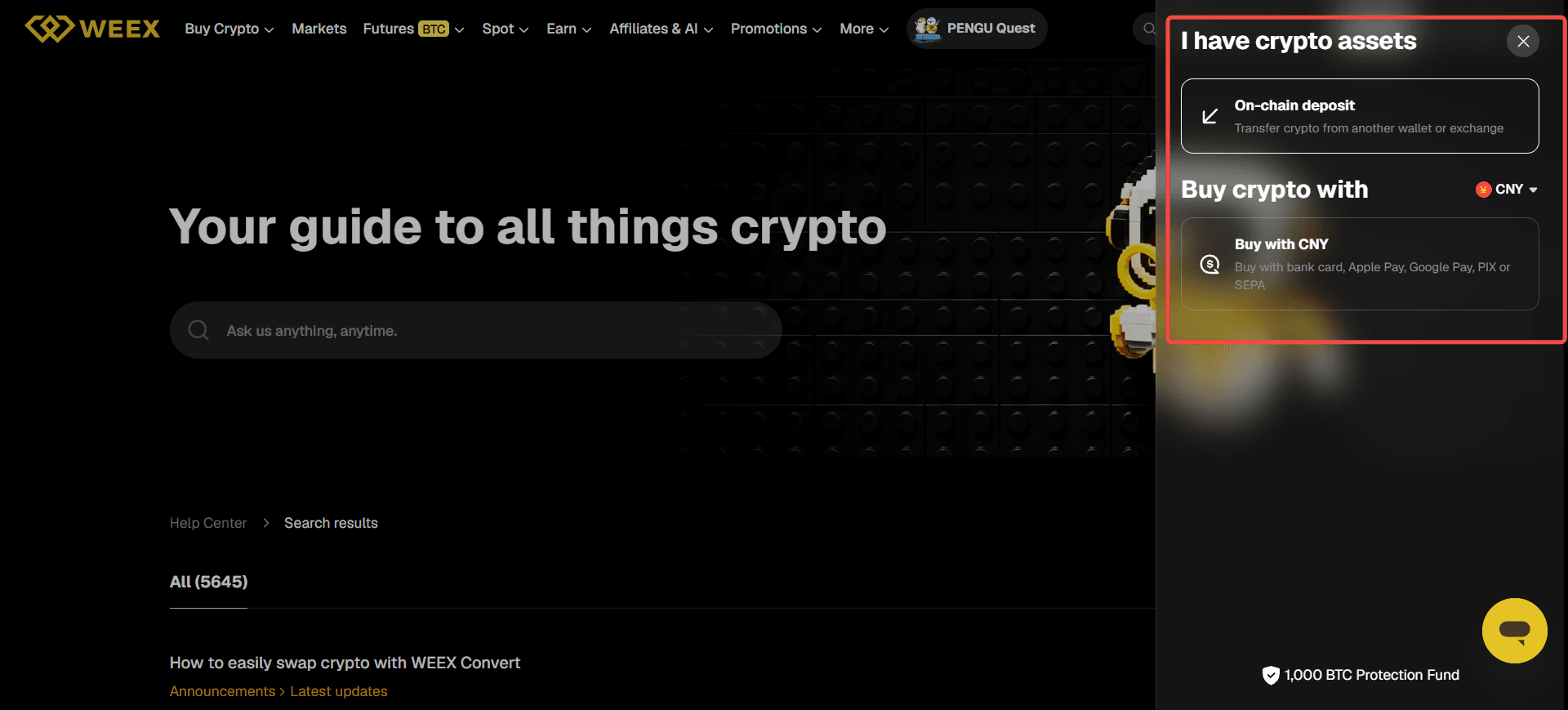
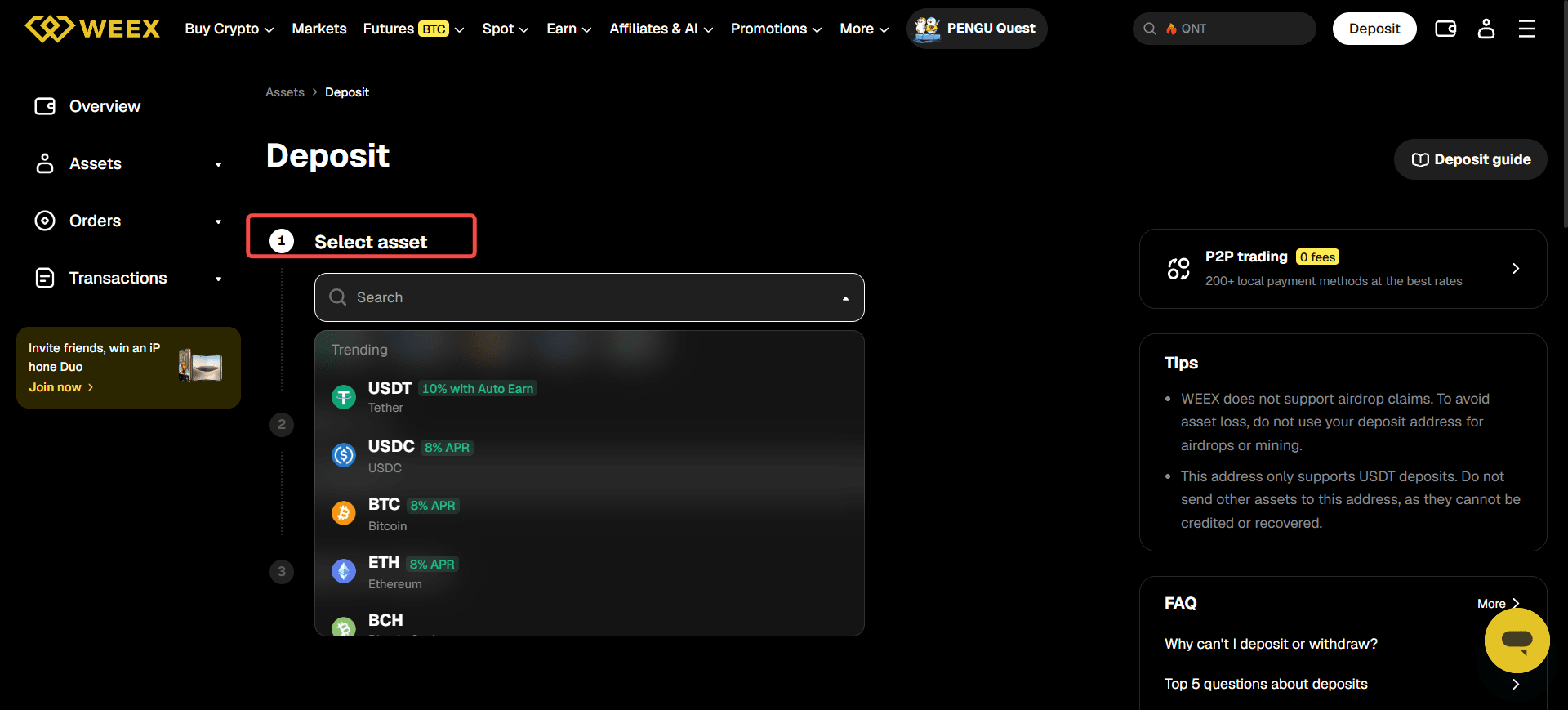
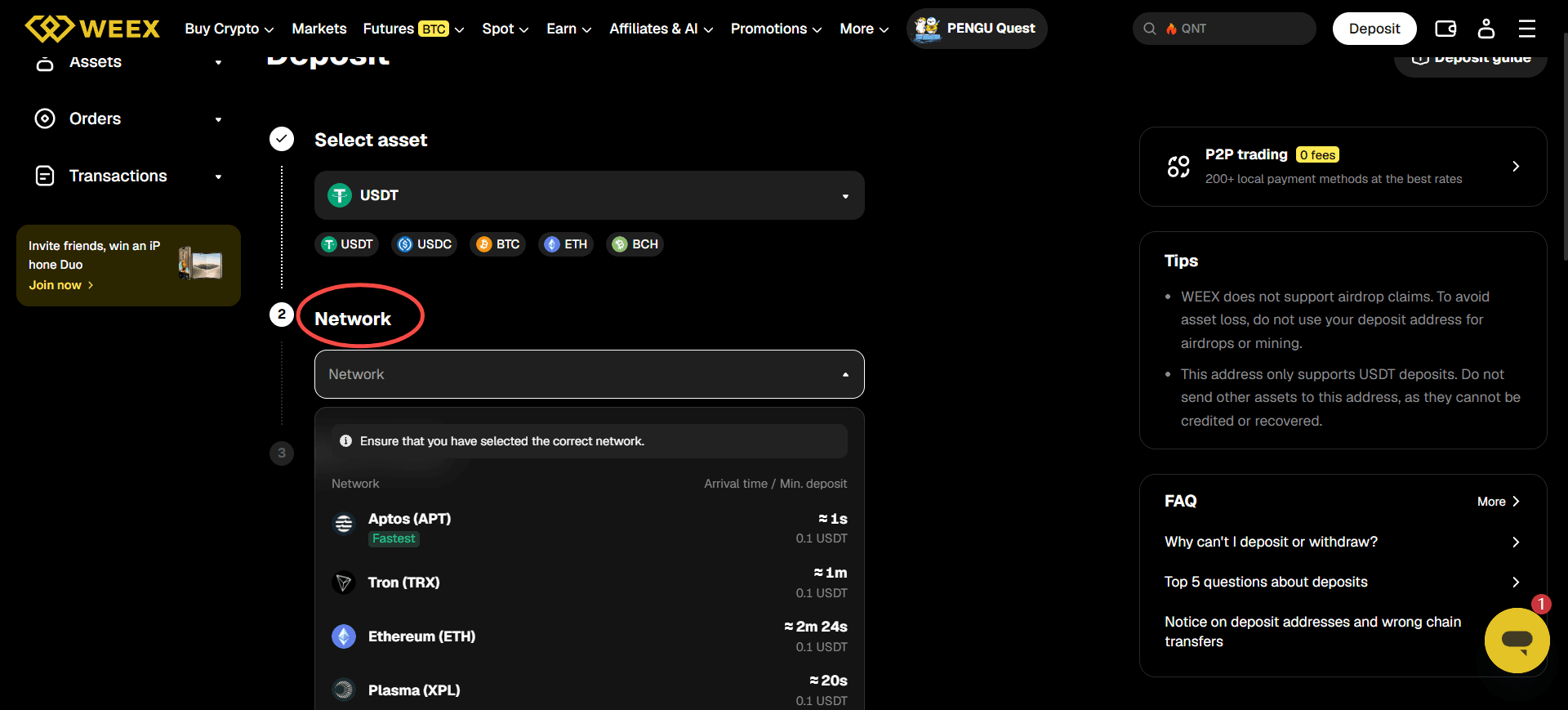
2. If you want to buy crypto assets with currencies on WEEX:
Step 1: Sign In and open Deposit. In your WEEX account, go to the Assets area and choose Deposit. Menu placement may differ between web and app versions.
Step 2: Click the Buy crypto with:
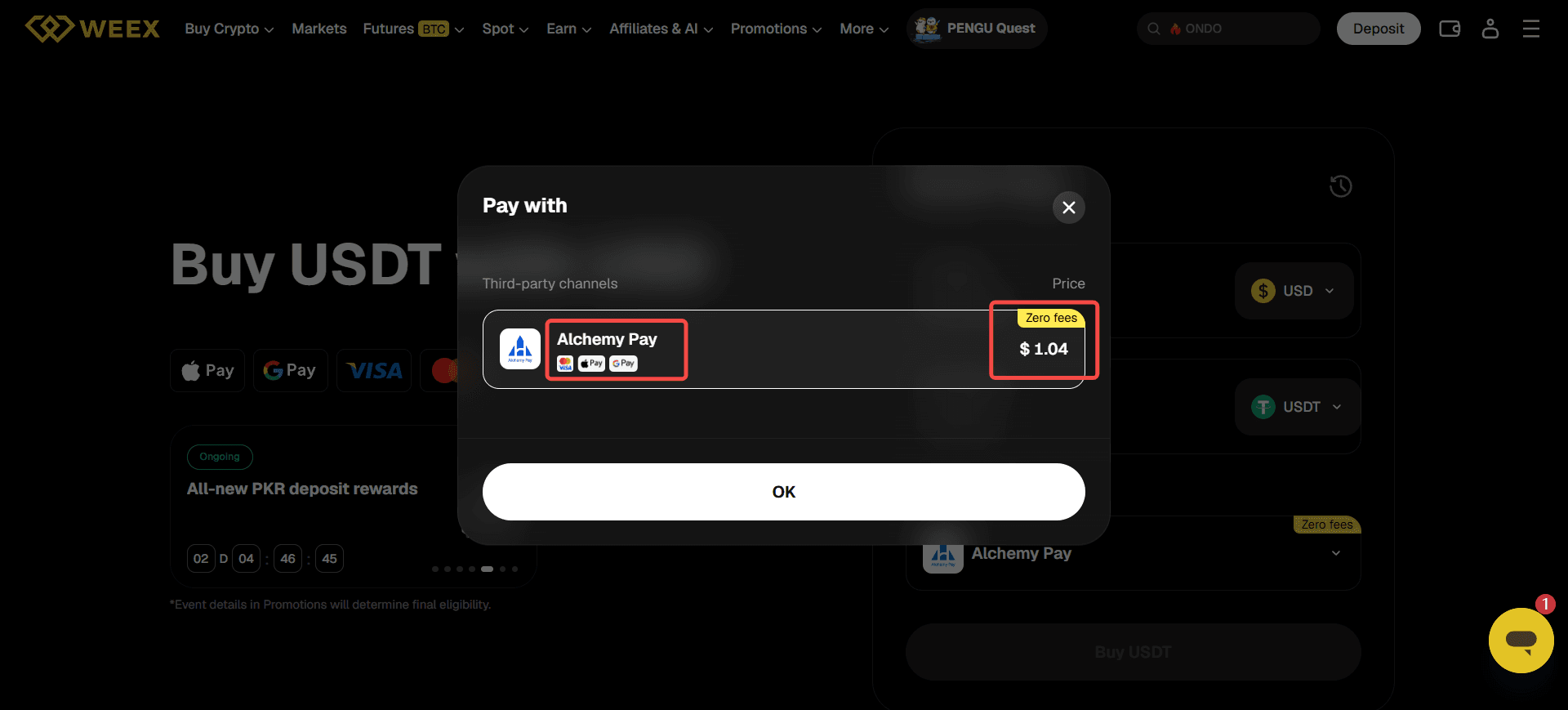
Step 3: Choose the currencies you want to pay, the crypto u want to buy and the payment method:
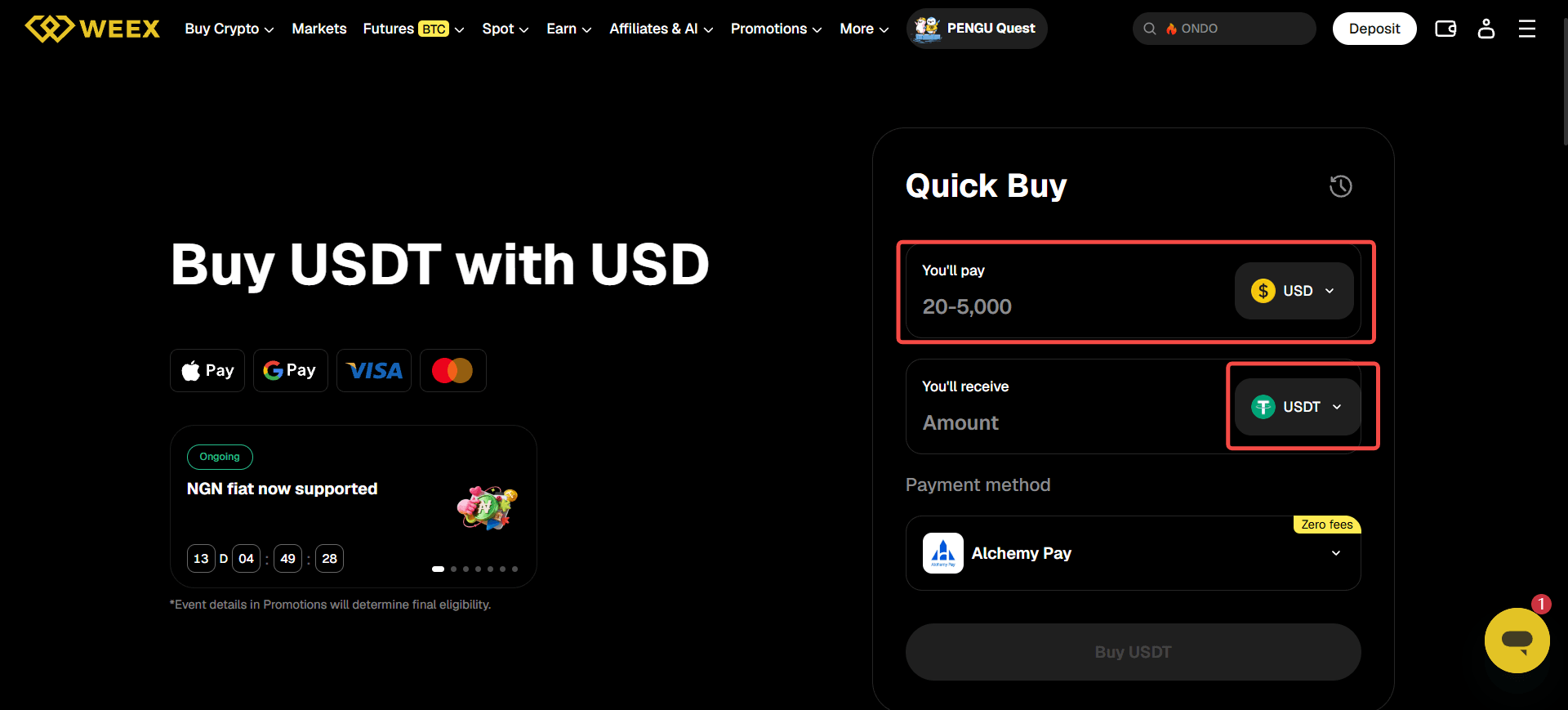
You can now pay with visa, google pay, apple pay and other payment method. Payment method may vary, depending on your region.
How Do You Buy and Sell Crypto on WEEX Spot?
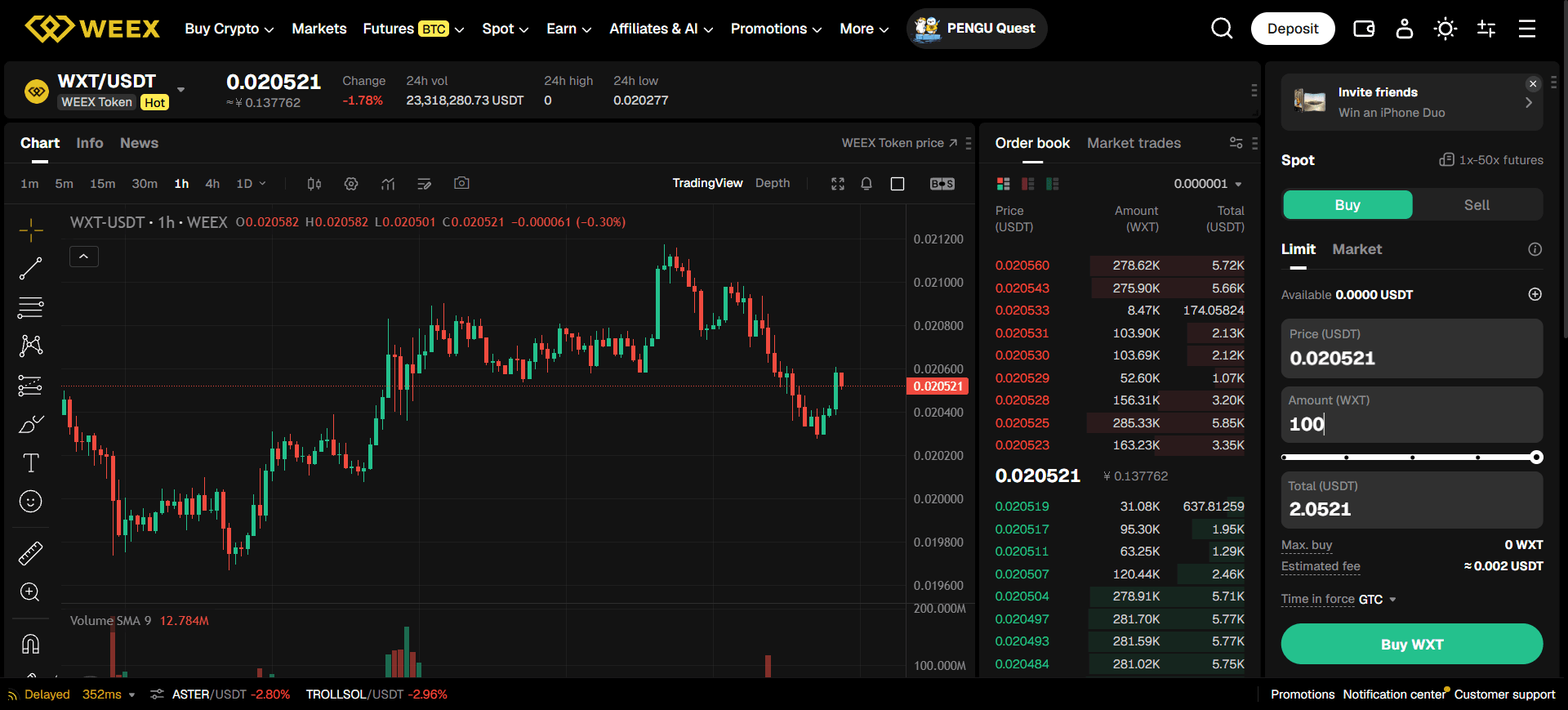
Spot trading uses a trading pair to exchange one supported asset for another. WEEX’s spot trading walkthrough covers the interface; the steps below retain the practical sequence from your original review.
Step 1: Log In and make funds available. Confirm that the asset you want to spend is credited to the account used for spot trading. If you have deposited funds into a different account area, check whether an internal transfer is needed.
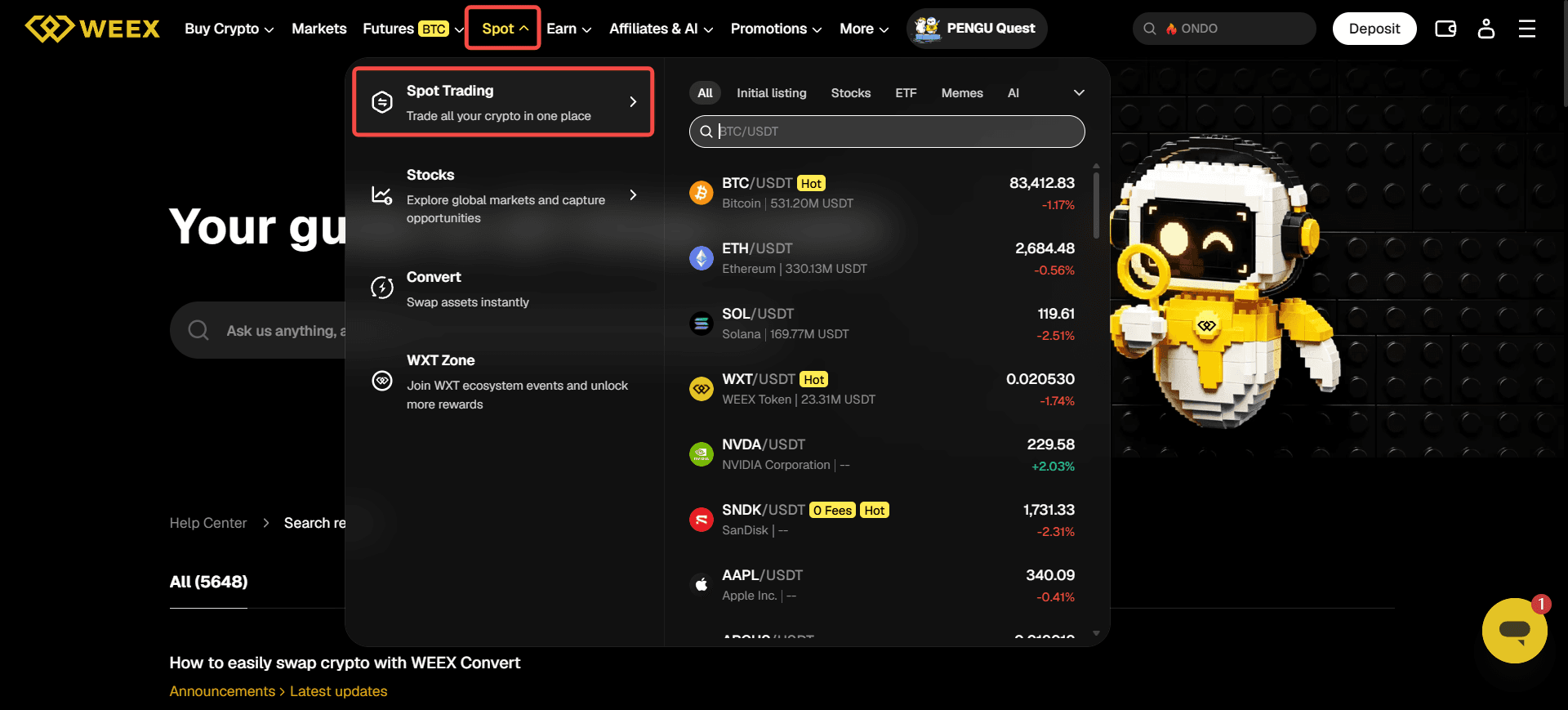
Step 2: Open Spot. Select Spot from the current web or app navigation. Confirm that you are on a spot trading page, not a perpetual futures page with a similar pair name.
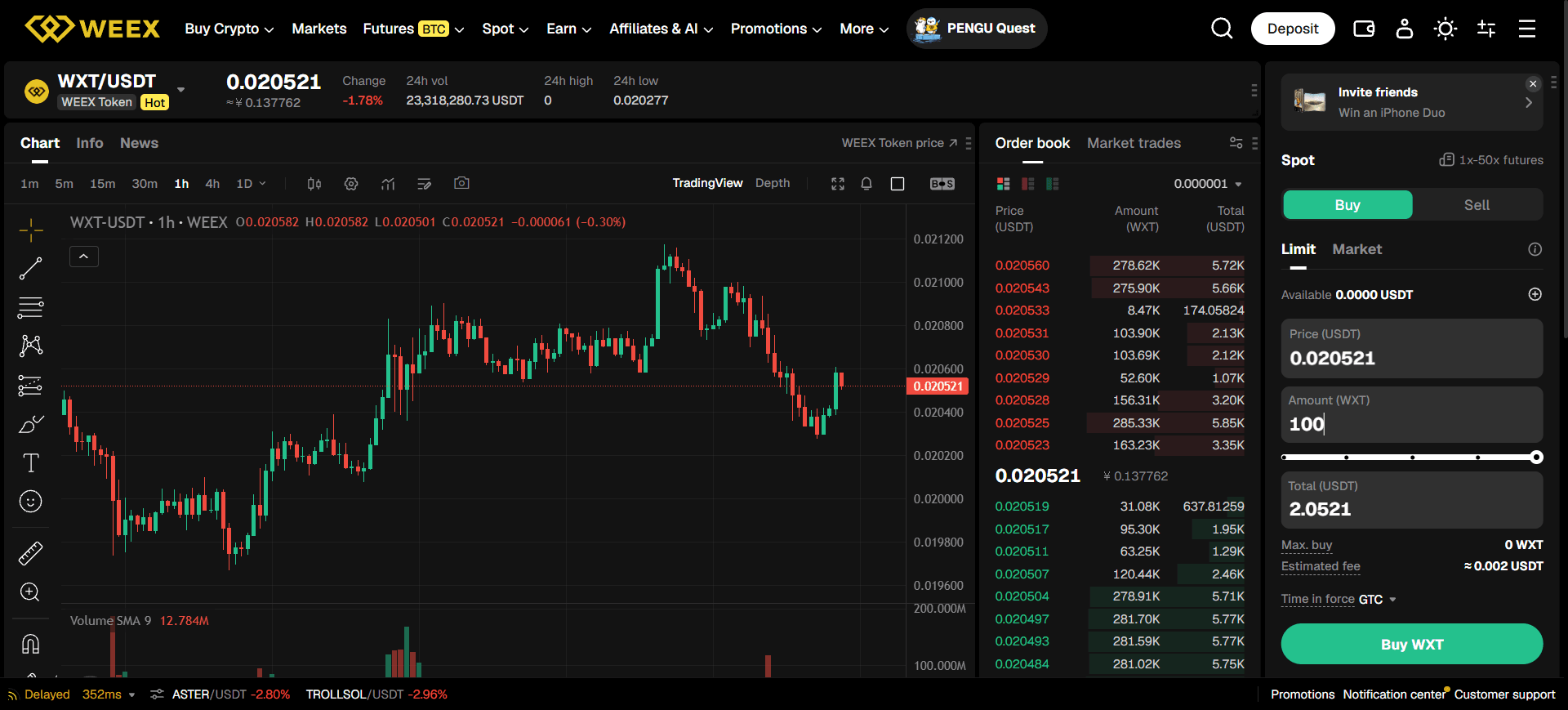
Step 3: Choose a trading pair. Search for the asset and its quote currency, such as a supported asset/USDT pair. Check that the market is available and that its order book contains enough quantity near the prices you are considering.
Step 4: Review the chart and order book. The last displayed price, best available bid or ask, and eventual fill price can differ. A large order may match several price levels. Check the spread and depth before choosing a market order.
Step 5: Choose Buy or Sell and select an order type.
- Select Market if you want the order to attempt execution against available liquidity promptly. Review the amount carefully; the exact average fill price is not guaranteed in advance.
- Select Limit if you want to specify the highest price you will pay to buy or the lowest price you will accept to sell. The order may remain open or fill only in part.
Step 6: Enter the amount and review the order. Check which field represents the asset quantity and which represents the amount to spend or receive. Inspect the estimated cost and the fee information shown for your account.
Step 7: Submit and check the result. After confirmation, look at Open Orders, Order History, or the equivalent current tabs. An open order has not necessarily filled; a partially filled order needs its executed and remaining quantities checked separately.
Step 8: Decide what to do with the resulting asset. You can keep an eligible balance on the exchange, use another available product, or review the withdrawal process below. Each choice has different custody, market, and fee implications.
If your order fills at a different price from the last price shown on the chart, read the order record before calling it a fee or a platform error. WEEX’s trading fee guide explains maker and taker fees; price differences can also reflect spread and execution across multiple orders.
Which Order Types and Execution Settings Can You Use?
The earlier article separately explained market, limit, GTC, IOC, FOK, Post Only, and take-profit orders. These terms remain useful, but availability can differ between spot, futures, web, app, and the particular order panel. WEEX’s order-execution guide explains the time-in-force instructions, while its futures order guide covers additional order types.
| Order or Setting | What It Is Intended to Do | What You Should Check |
|---|---|---|
| Market | Attempt prompt execution using available orders | Slippage and the eventual average fill price |
| Limit | Set a buy ceiling or sell floor | Whether it fills, partly fills, or stays open |
| GTC | Keep an eligible order open until filled or canceled under its rules | Whether you still want the order later |
| IOC | Fill what can execute immediately; cancel the remainder | Whether a partial fill is acceptable |
| FOK | Require full immediate execution or cancel | Whether the book can fill the entire amount |
| Post Only | Prevent an eligible order from immediately taking liquidity | Whether the order cancels instead of posting |
| Trigger | Act when a specified trigger condition is met | The trigger source and the resulting order |
| Take Profit / Stop Loss | Create an intended exit condition | Trigger, order type, slippage, and position size |
A limit order is not always a maker order. If your price allows immediate matching, it may execute as a taker. Post Only is relevant when you specifically want to avoid an order immediately removing liquidity, but its cancellation behavior needs to be understood before use.
A stop-loss is a risk-management instruction, not a guarantee that a volatile market will provide your preferred closing price. Check WEEX’s take-profit and stop-loss guide for the options offered on its futures interface.
How Do You Open and Close a WEEX Futures Position?
Futures trading uses contracts and margin. A long position takes exposure to a rise in the relevant contract price; a short position takes exposure to a fall. Leverage magnifies the effect of price movement relative to the margin allocated. WEEX’s web futures tutorial uses USDT-margined futures as its example.
Step 1: Open the futures trading page. After logging in on the web, go to Futures and select USDT-M Futures if that is the product you intend to trade.
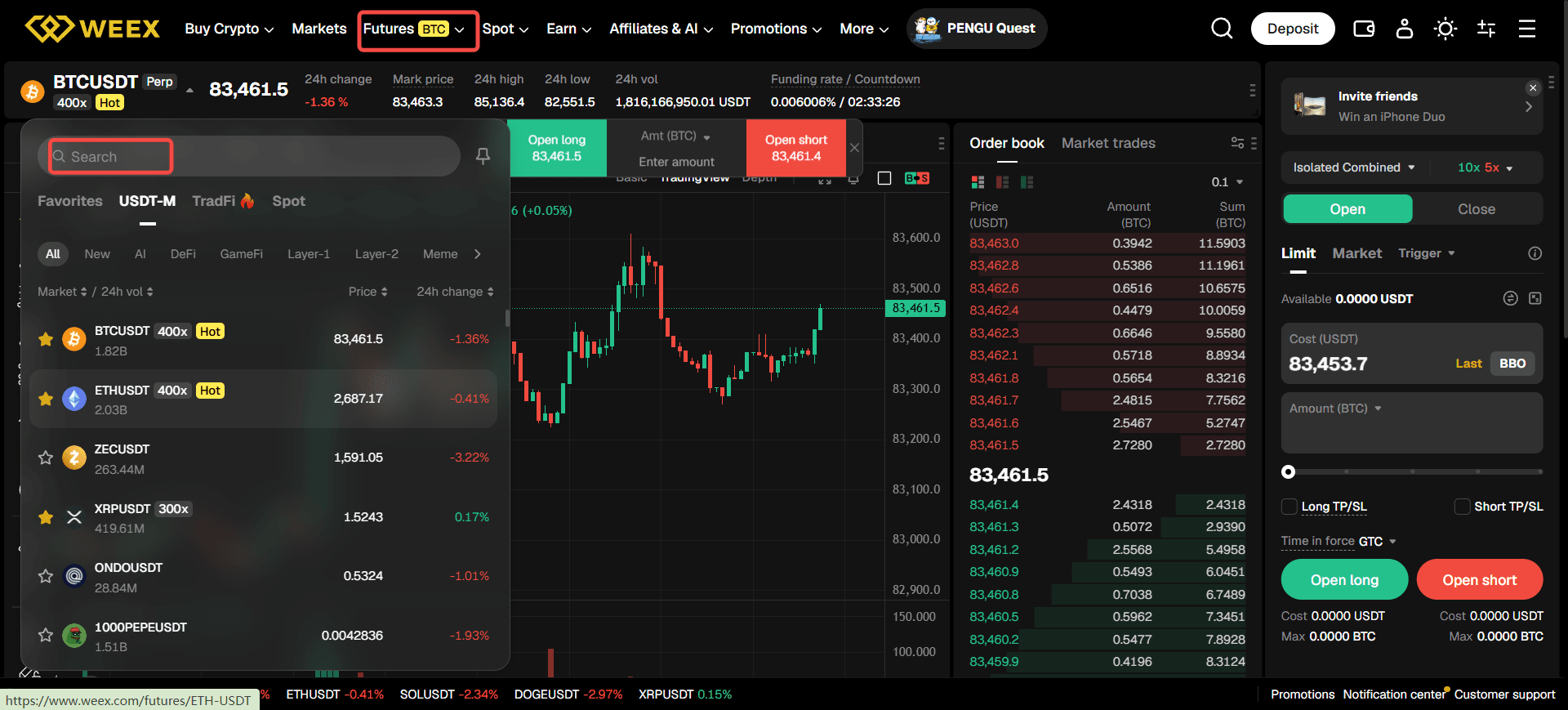
Step 2: Choose the trading pairs. Use the pair selector, generally near the top of the trading page, to find the contract. Read its displayed rules rather than assuming every pair has the same leverage or trading conditions.
Step 3: Make the required funds available. Check the account balance used for this futures product. If the funds are in another WEEX account, use the available transfer function and confirm the destination before trading.
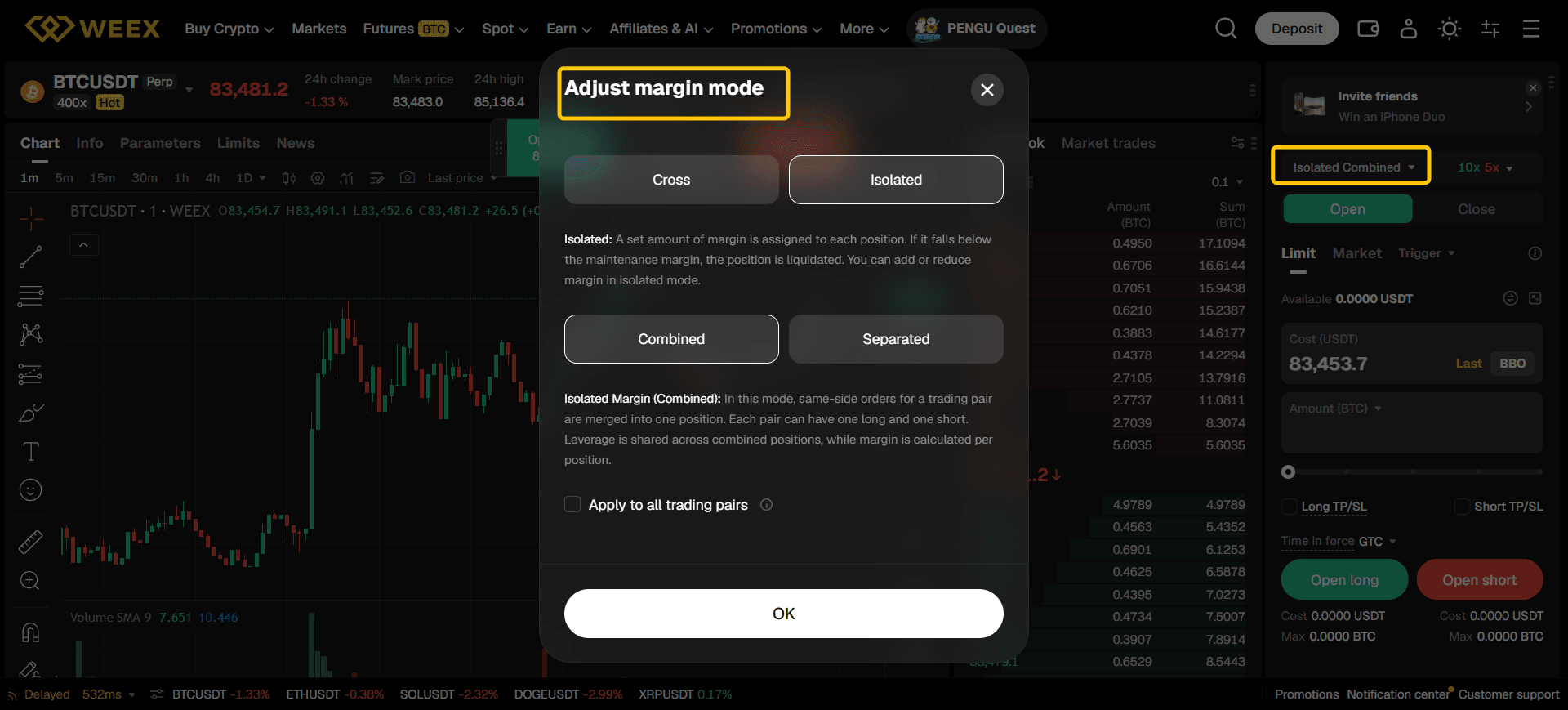
Step 4: Select Cross or Isolated Margin. This setting changes which available funds may support a position. Read the margin section below before choosing.
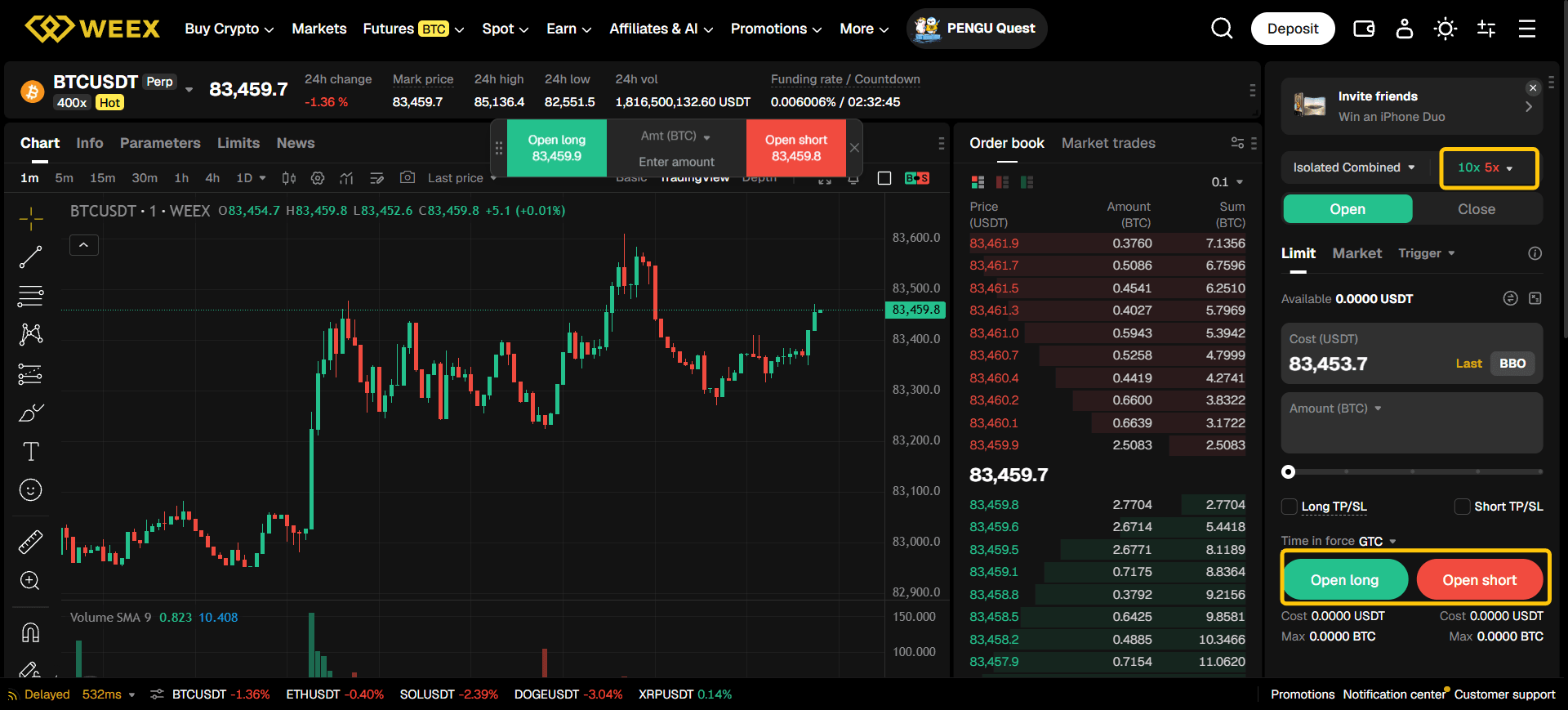
Step 5: Set leverage. Select a leverage level supported for the chosen contract and position tier. Higher leverage reduces the initial margin required for a given position size but increases sensitivity to adverse price movement and liquidation risk.
Step 6: Select the order type. Choose Market, Limit, or another available option. For a market order, pay attention to potential slippage; for a limit order, account for the possibility that it will not fill.
Step 7: Enter the amount and choose the side. Use the interface’s Open Long or Open Short action as appropriate. Before confirming, inspect the estimated position value, required margin, fee information, and estimated liquidation price.
Step 8: Consider a take-profit or stop-loss instruction. If the interface offers it, check the trigger type, trigger price, and resulting order behavior. These controls do not eliminate the possibility of a loss beyond your intended exit price under difficult conditions.
Step 9: Monitor the open position. Check the position size, unrealized PnL, margin ratio, liquidation estimate, and any funding payment or receipt. Avoid assuming that placing a stop instruction means the position no longer needs attention.
Step 10: Close or reduce the position. Use the closing controls for the correct position side, review whether you are closing the whole position or only part of it, and confirm the resulting order. Inspect your completed-order and account records afterward; both opening and closing can generate trading fees.
WEEX has announced leverage of up to 400× for certain BTC and ETH futures arrangements, but limits depend on the specific contract and position tier and can change. Do not present 400× as a universal default. The futures calculator guide explains how to estimate PnL, exit price, and liquidation price before submitting an order.
【图片建议:使用 WEEX 的 USDT-M Futures 模拟盘截取“选择交易对 → Cross/Isolated → 杠杆 → 订单类型 → Open Long/Open Short → 持仓与 Close”六个关键区域;保留 Demo 标识,不展示真实资金或将模拟盈利当作实际收益;ALT: WEEX futures demo walkthrough showing pair, margin, leverage, opening, and closing controls】
How Do Leverage, Cross Margin, and Isolated Margin Affect Risk?
Margin is the collateral supporting a futures position. In a simplified illustration, 100 USDT of initial margin at 10× leverage can create approximately 1,000 USDT of initial position exposure, before fees, funding, maintenance margin, and subsequent price movement. That relationship explains position size; it is not a complete liquidation formula.
In Cross Margin, available funds in the applicable margin pool can support positions under that mode. A losing position can therefore affect funds available elsewhere in that account. In Isolated Margin, margin is assigned to a particular position; adding margin or changing position settings can alter the amount at risk. WEEX’s Cross versus Isolated guide describes the differences.
To examine your setup step by step:
- Open the chosen futures contract and identify its margin mode.
- Check the selected leverage and position size.
- Use WEEX’s futures calculator to estimate the entry requirements and liquidation price.
- Compare the estimated liquidation price with your planned stop level and the contract’s recent volatility.
- Check whether any automatic margin feature is enabled for the position.
- Recalculate after changing size, leverage, mode, or allocated margin.
The actual liquidation mechanism uses more than the simple “margin × leverage” expression. WEEX’s liquidation-price explanation describes the relevant mechanics. A margin-mode setting reduces or changes certain exposures; it does not make a leveraged trade safe.
If you are learning the interface, the WEEX futures simulator offers a place to practice locating the controls. A demo fill is still not proof that a future live order will achieve the same price.
How Do You Set Up WEEX Copy Trading?
Copy trading lets a user follow eligible trading activity from an Elite Trader. The follower still chooses settings and bears the results in their own account. WEEX’s copier settings guide lists the detailed controls; its copy trading overview explains the risks.
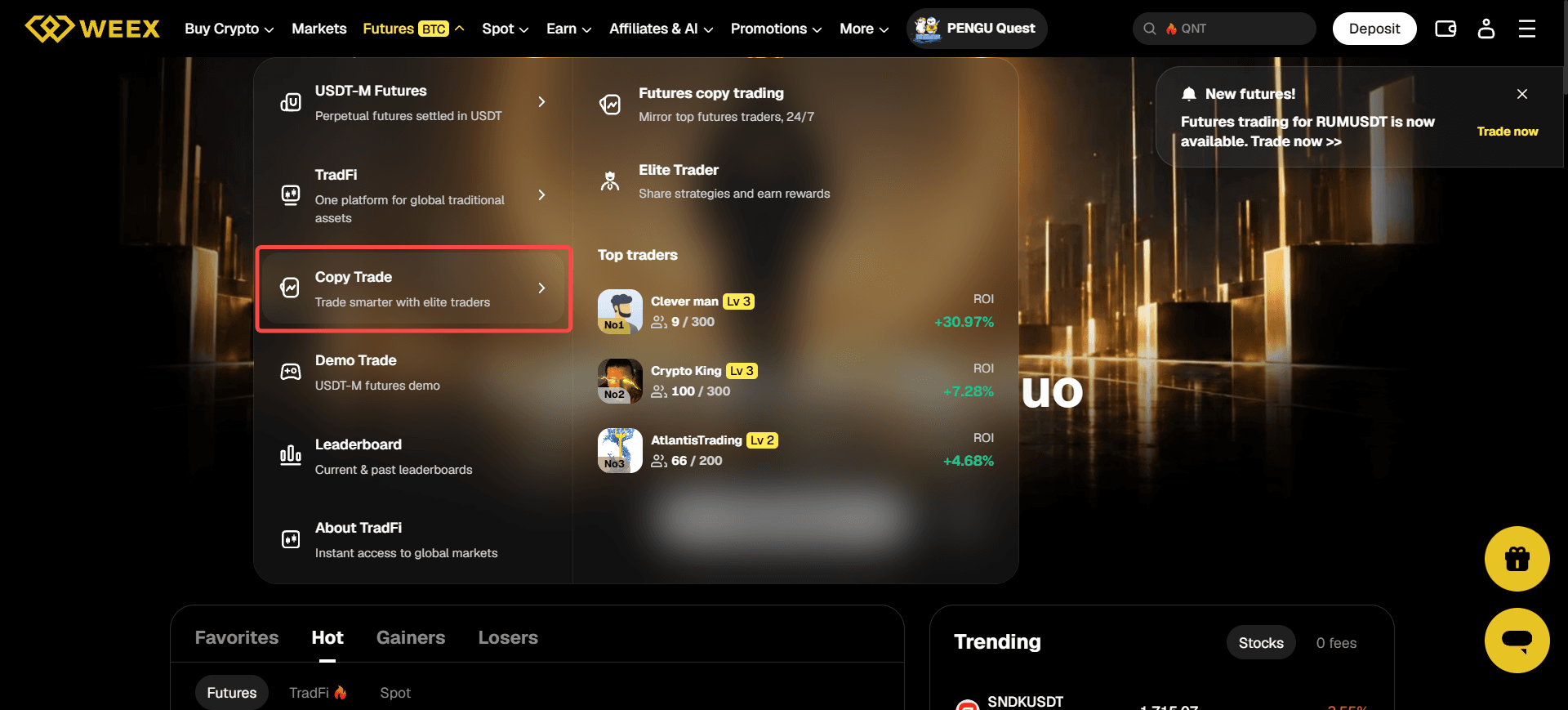
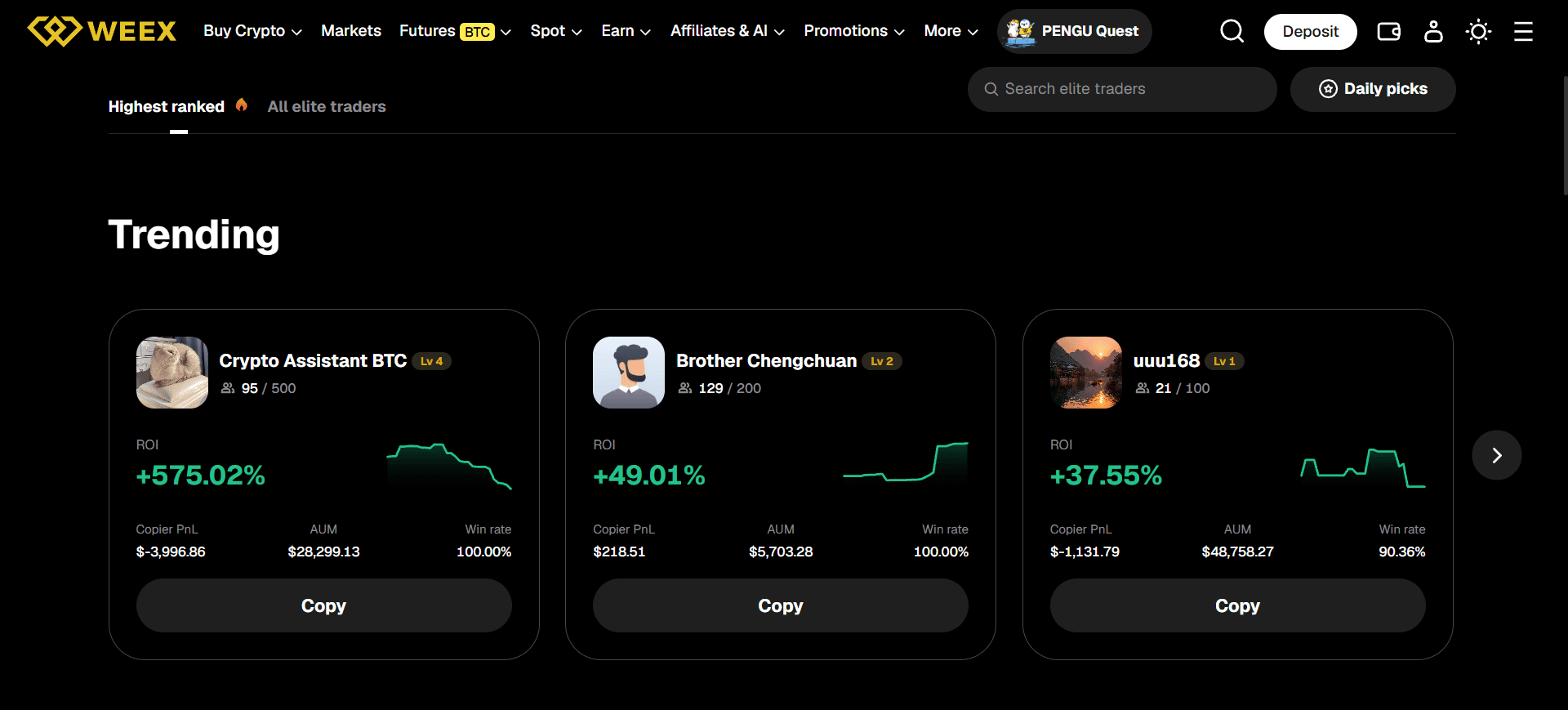
Step 1: Open Copy Trading. From WEEX’s navigation, go to the copy trading section and inspect the available Elite Traders.
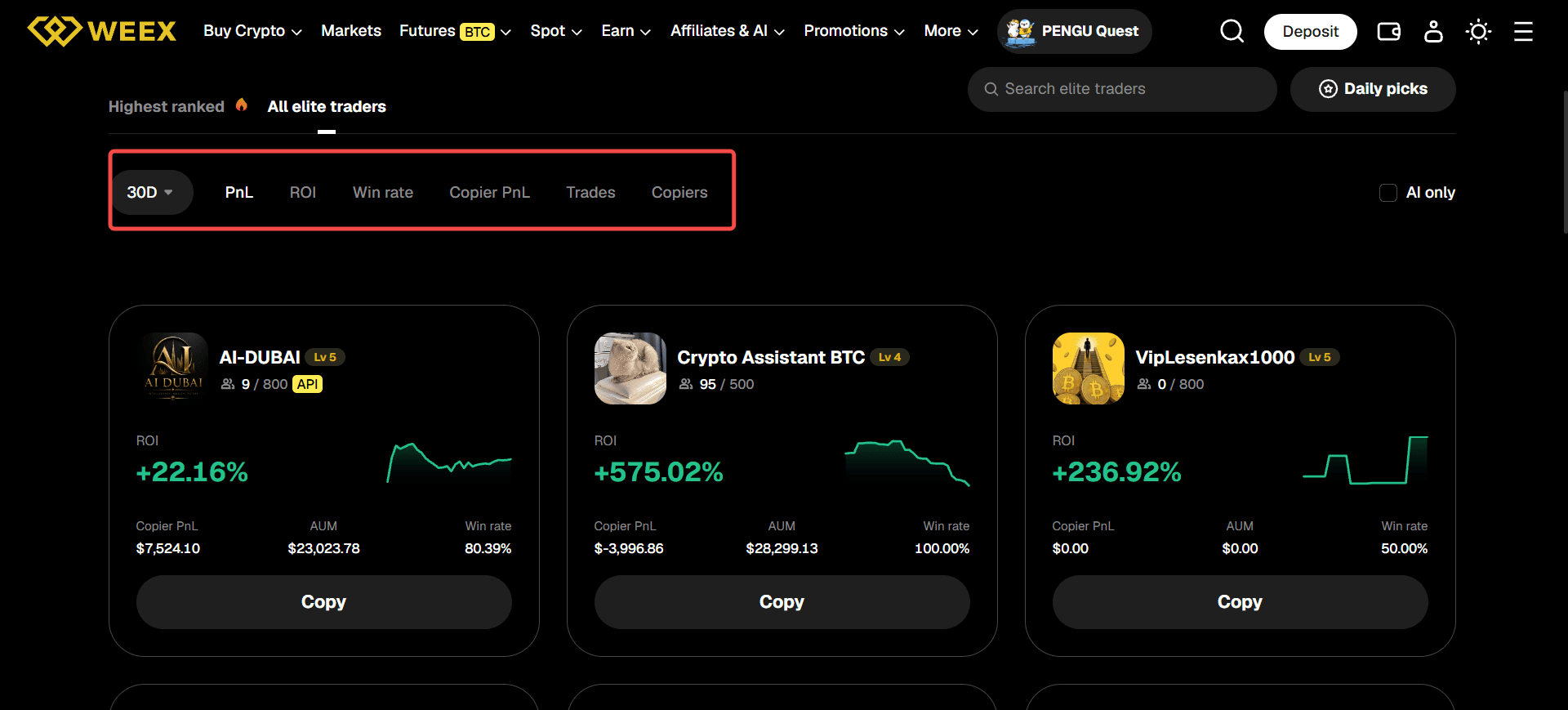
Step 2: Review a trader’s record. Examine the visible performance window, trade history, risk indicators, and supported futures pairs. A recent profit figure alone cannot tell you how much downside the strategy has taken or may take.
Step 3: Select a trader and read the agreement. Open that trader’s copy trading settings page. Read the applicable Copy Trading Terms before selecting Copy.
Step 4: Select the pairs to follow. Choose which of the trader’s eligible futures pairs you want copied. Following a trader does not require copying every pair if the interface gives you a selection.
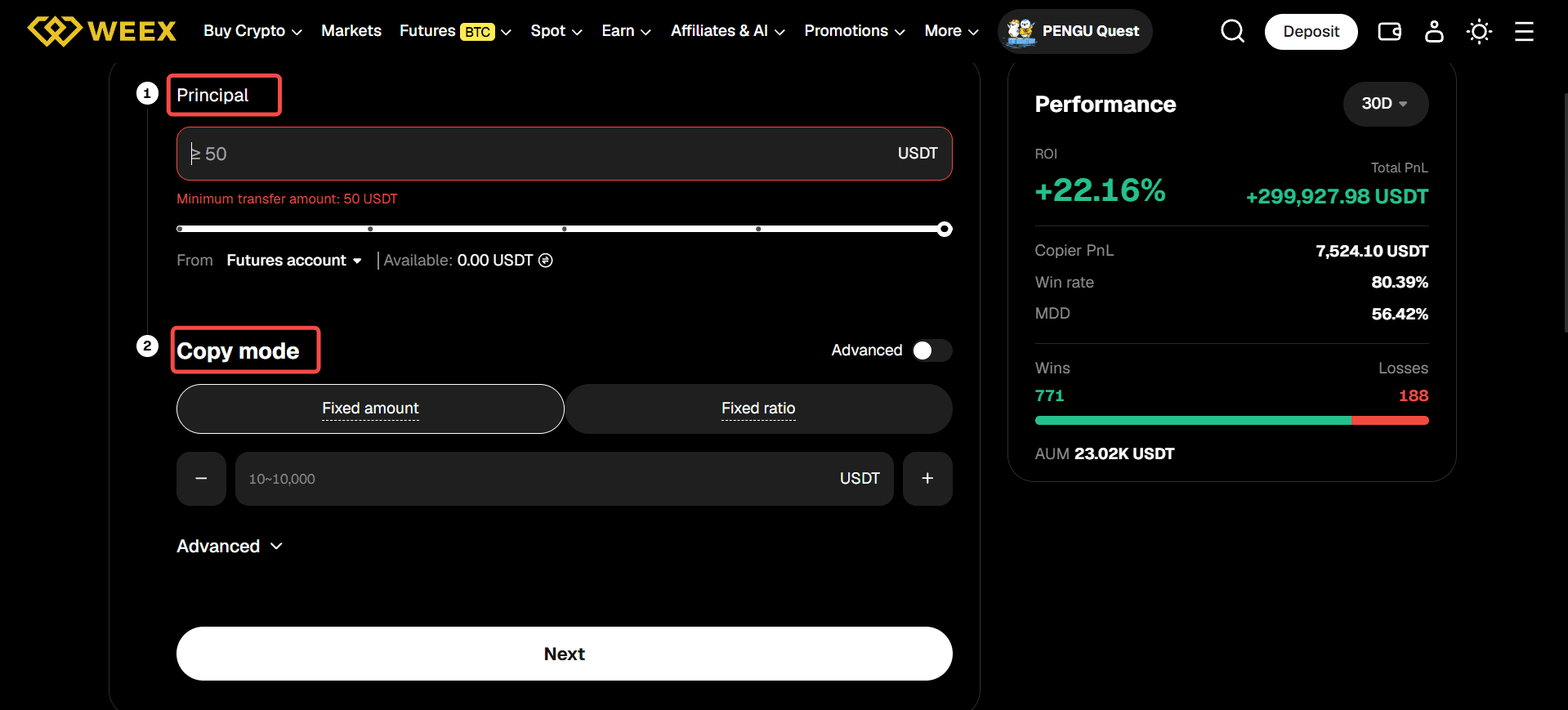
Step 5: Fund the account used for copying. Check the Copy Account and available transfer control in your current interface. WEEX’s 2026 copy trading account update introduced a dedicated Copy Account separate from personal futures trading; an older guide’s instruction to look only at the regular futures balance may not match an upgraded account.
Step 6: Configure margin and copy amount. Depending on the options displayed, you may choose Uniform settings across pairs or Separated settings for individual pairs, then select a fixed USDT amount or fixed ratio. Examine the available leverage-setting mode and what it will do when the Elite Trader opens a position.
Step 7: Set risk controls. Check the available take-profit, stop-loss, slippage, and maximum copy amount settings. The limits and allowed ranges displayed in your account take precedence over an older article’s screenshots.
Step 8: Confirm and monitor. Review the summary and begin copying only after checking the funding and limits. Then look at your own copied positions and records. If the trader already had an open position when you began following, WEEX’s settings guide says copying starts with their next eligible opening trade, rather than automatically reproducing the existing position.
A follower’s entry and exit can differ from the Elite Trader’s because orders occur at different times and can face different available liquidity. WEEX’s published copy trading materials also describe a profit-sharing arrangement in addition to normal trading fees. Read the current terms and account display before estimating your net result. Copy trading is a way to automate selected actions, not a guarantee of the trader’s displayed returns.
How Do You Join WE-Launch, and What Does WXT Do?
WXT is WEEX’s platform token. WEEX describes WXT-related uses including participation in WE-Launch and qualifying for certain platform benefits. Holding WXT also exposes the holder to the token’s market price. The WEEX WXT guide covers its token history and currently described uses.
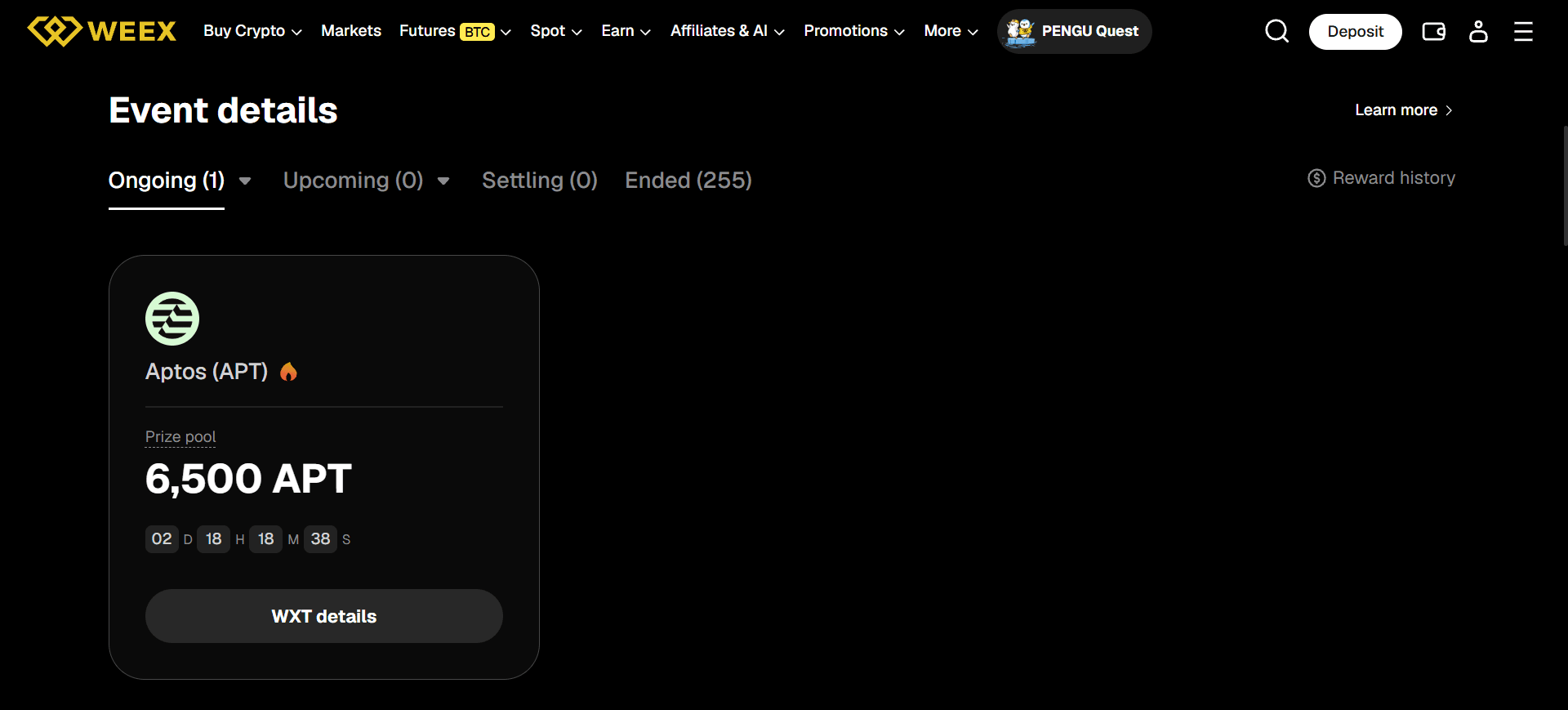
WE-Launch is an event-based reward program. Its participation mechanics have changed since the old review was written. WEEX’s newer WE-Launch participation guide describes event participation and an average hourly WXT spot-holdings calculation, rather than the old blanket instruction to hold 1,000 WXT for two consecutive days and commit it.
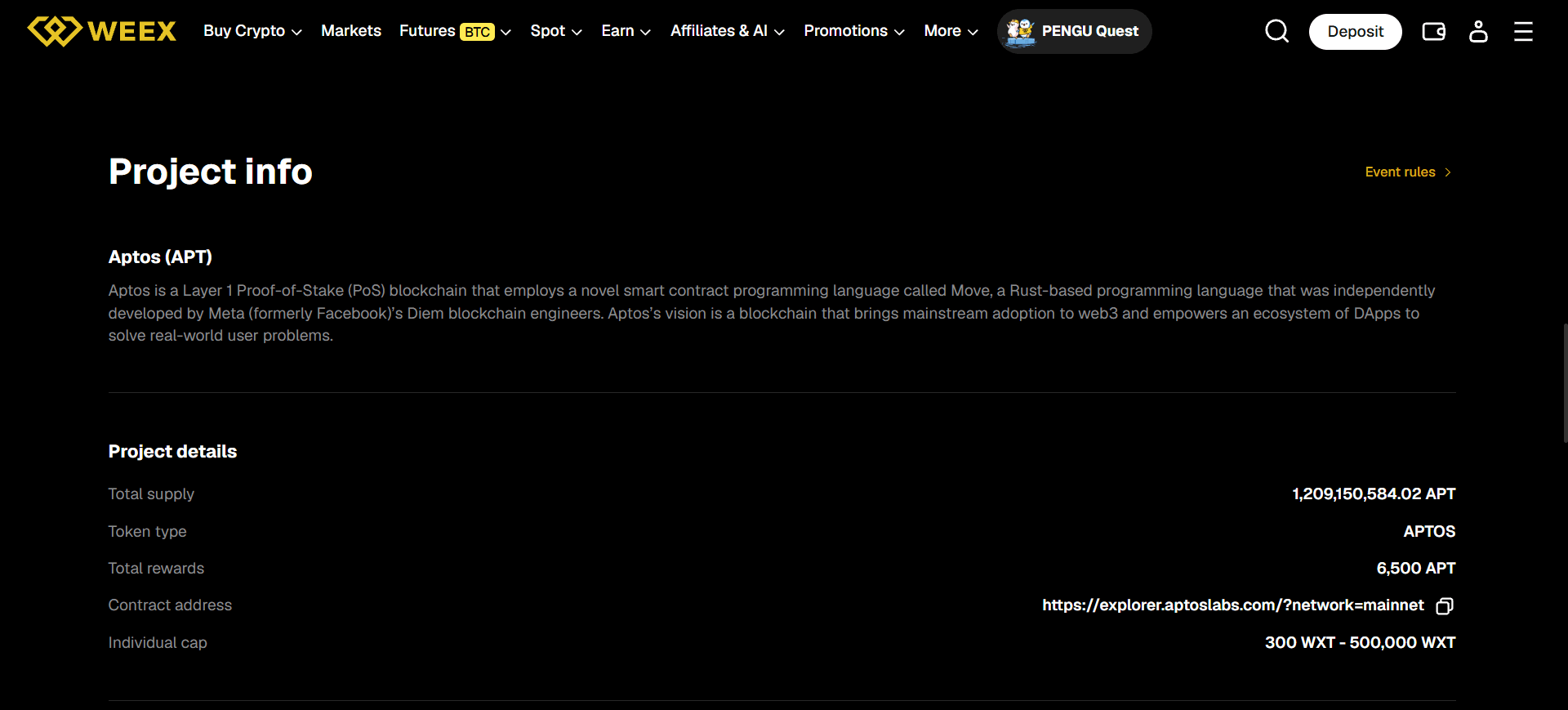
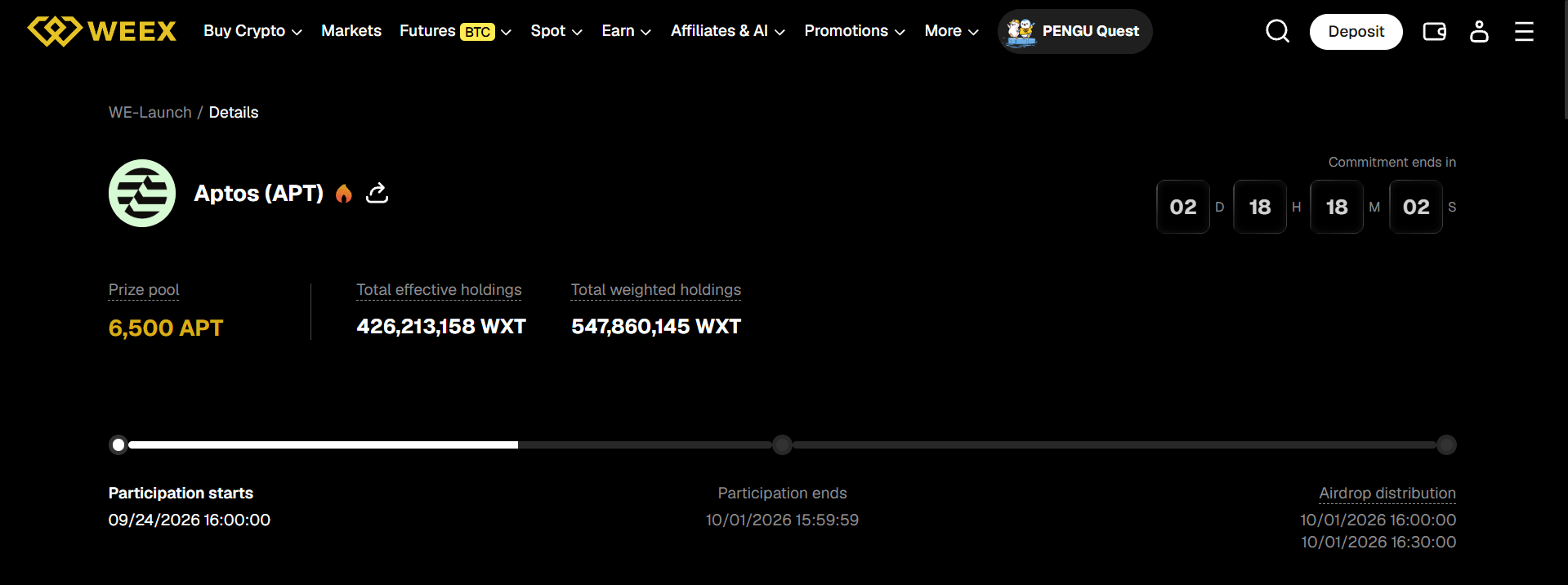
Step 1: Open the current WE-Launch event page. Go to WE-Launch, choose an active project, and read its event period, eligibility, reward asset, and any project-specific conditions.
Step 2: Select Join Now. The newer WEEX guide says holding WXT alone does not automatically enroll you. Join the particular event through its event page.
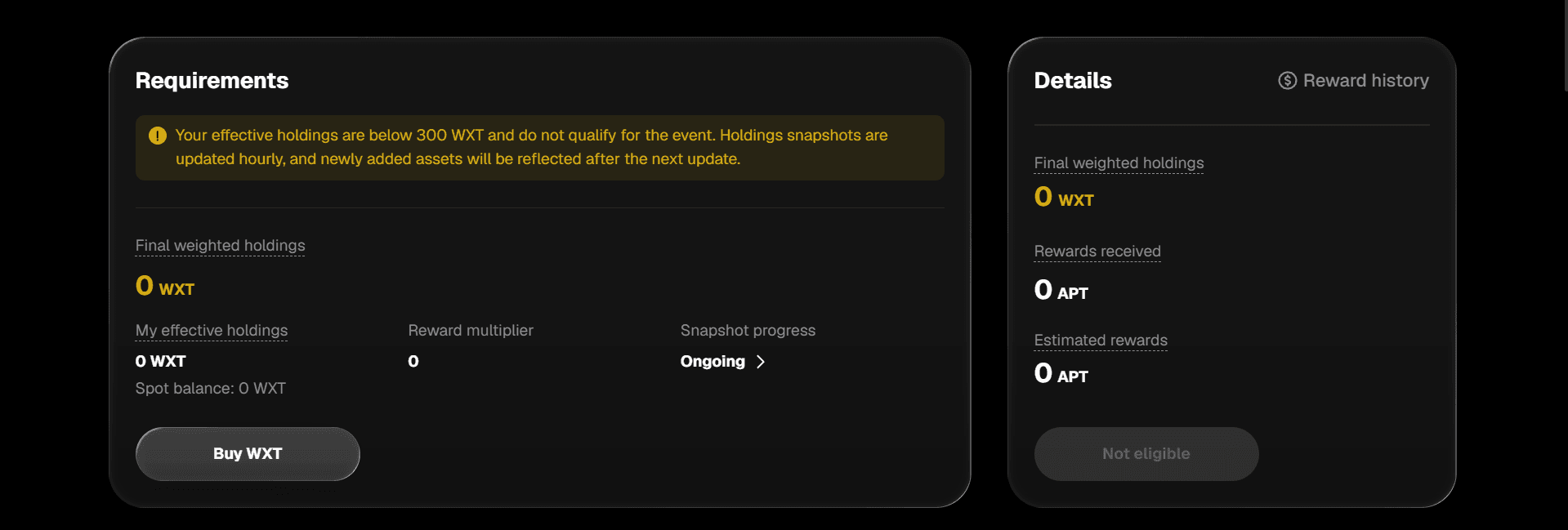
Step 3: Keep eligible WXT in your spot account. The participation guide describes random snapshots taken during each hour of the event to calculate average WXT spot holdings. It gives at least 300 WXT in average hourly holdings as the general threshold. WXT held in staking or another account does not count under those stated rules.
Step 4: Monitor holdings during the event. Buying 300 WXT near the end of a multi-day event may leave your event-wide average below 300 WXT. Selling or transferring WXT partway through can also change the average. Read the specific project’s rules rather than assuming a balance visible at one moment determines eligibility.
Step 5: Review the event’s final calculation and distribution. Check the published event result and your account’s distribution record. A preliminary estimate is not the same thing as a final credited reward. The event page should state its timing and any additional requirements.
The old article also described WXT staking yields and token burns as reasons to expect long-term gains. A fixed historical yield should not be presented as an ordinary return from merely holding WXT; any current staking offer needs its own terms and dates. A token burn changes supply according to the documented transaction, but does not guarantee that WXT’s price will increase. WEEX’s WXT guide records the January 2025 initial burn and a later supply update; use the latest dated source when quoting supply.
How Do You Invite Friends Through the WEEX Referral Program?
The Referral Program uses an invitation link or code to establish a relationship between an existing user and someone registering through that invitation. Rewards depend on current eligibility and qualifying activity. WEEX’s referral rules explanation describes the distinction between an invitation, a reward, and an affiliate arrangement.
Step 1: Log In and open your invitation tools. Find Invite Friends, Referral, or the corresponding account entry shown in your current interface.
Step 2: Read the applicable rules. Check what the program currently rewards, which activities count, and whether there is a time-limited campaign. A registration reward, trading task, and ongoing commission may have separate conditions.
Step 3: Copy your personal link or code. Use the issued URL, code, or QR option. If a friend intends to use your code, they should confirm it appears during signup. WEEX’s app beginner guide specifically notes this attribution step.
Step 4: Share accurate information. Explain that the recipient needs to check product and regional eligibility and may face identity-verification requirements. Do not promise a fixed reward or profit before reading the campaign terms.
Step 5: Check the referral record. Review any invited-user count, task status, or eligible commission shown in your account. If a user does not appear, compare the registration route and code with the applicable program rules before contacting support.
The old article promised 50% commission to anyone who referred a friend. WEEX’s commission guide explains that rates and eligible activity vary by program and campaign. Use the rate shown for your account and the offer that actually applies.
How Do You Apply for the WEEX Affiliate Program?
The Affiliate Program is aimed at eligible partners who want to promote WEEX and use broader tracking and commission tools. Having an ordinary referral link does not automatically make someone an approved affiliate. WEEX’s Affiliate Program guide explains the approval flow.
Step 1: Open the official Affiliate Program page. Read its current eligibility requirements, benefits, and commission structure before applying.
Step 2: Submit an application. Provide the information the form requests about your audience, channel, community, or partnership background. Do not assume a particular approval time; the old article’s “one to two business days” is not a universal current commitment.
Step 3: Wait for the program’s decision. WEEX reviews affiliate applications. An application does not by itself grant partner status or a commission rate.
Step 4: Access your affiliate tools if approved. Sign in to the available dashboard and inspect your issued links, referral attribution, eligible activity, and commission records.
Step 5: Share the correct affiliate link and track results. Use the tools attached to your approved account. Compare a referred user’s eligible activity and the dashboard record with the applicable program terms if a commission appears missing.
Step 6: Separate ongoing terms from temporary campaigns. An event may offer an additional reward for a limited period. Check its dates and qualifying actions instead of adding the campaign rate to your standard affiliate arrangement automatically.
WEEX’s Affiliate Program Terms govern participation and commission eligibility. This program can matter to creators evaluating WEEX as a partner, but a potential affiliate payment is separate from whether the exchange’s execution, fees, and account processes suit an ordinary trader.
What Fees and VIP Rates Does WEEX Charge?
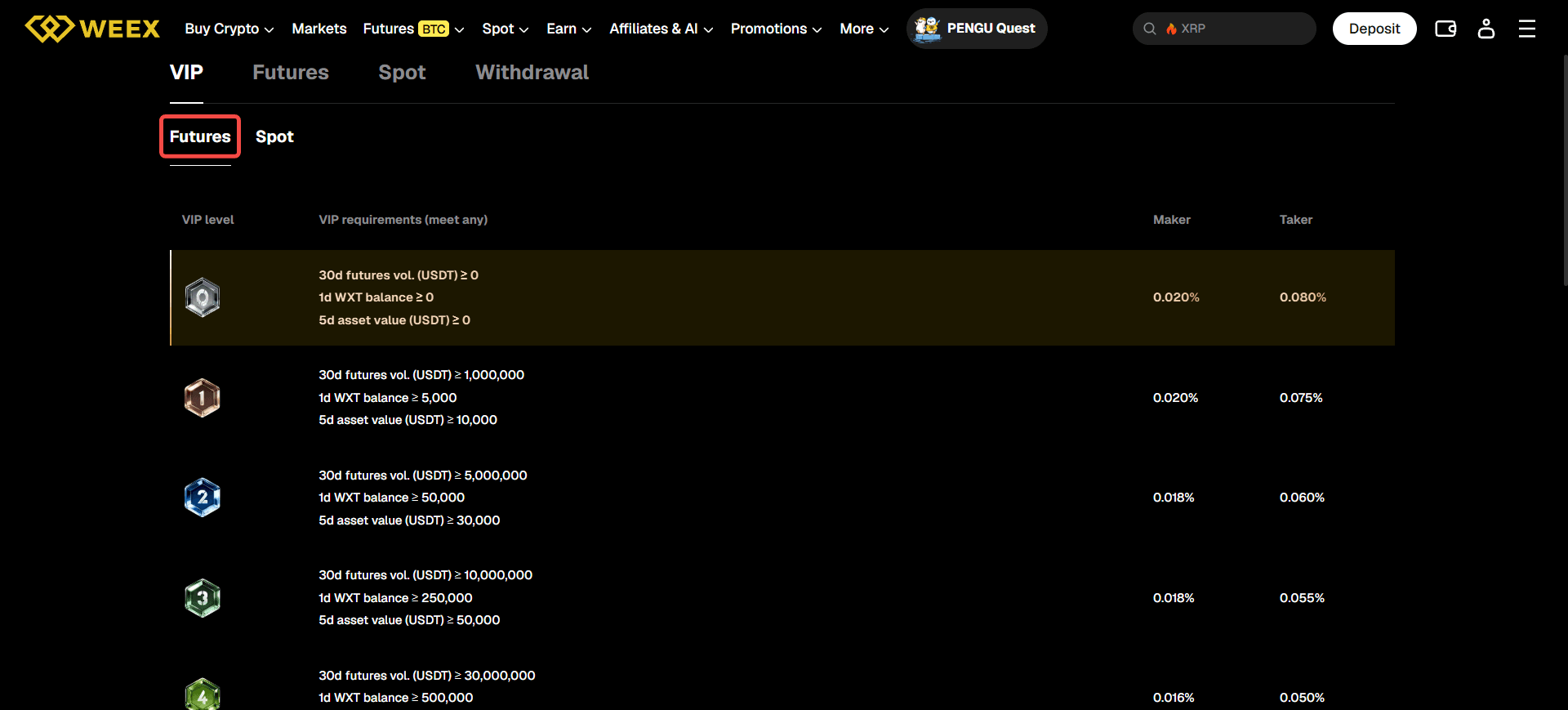
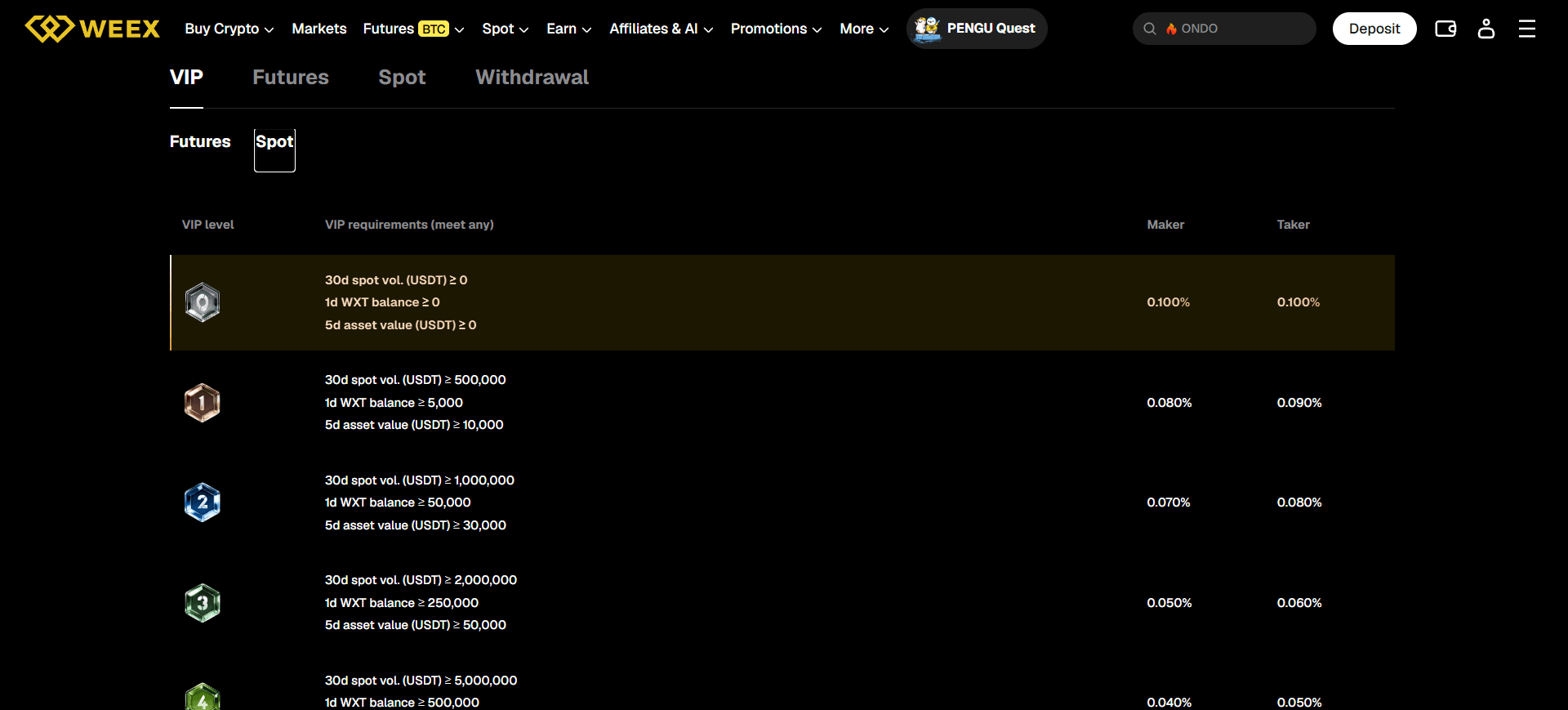
The old review correctly separated spot and futures fees, but its WXT discount claims should not replace today’s published rate tables. At the published VIP 0 tier, WEEX’s reference trading rates are:
| Product | Maker Fee | Taker Fee |
|---|---|---|
| Spot | 0.100% | 0.100% |
| Futures | 0.020% | 0.080% |
These figures describe a general VIP 0 reference. Check the rate standards page, the rate displayed in your account, and the intended product before placing a trade.
Here is how to check your actual cost:
- Identify the product: spot or futures.
- Identify the execution: an order resting on the book may be maker; one matching available liquidity is taker. A limit order is not automatically maker.
- Check your current VIP level: open the WEEX VIP Program while signed in.
- Read the displayed maker/taker rate: use the rate applying to your account and chosen market.
- For futures, consider both sides of the trade: opening and closing can each generate a trading fee; perpetual funding is separate.
- For withdrawals, check the selected network: the displayed withdrawal charge and minimum can vary by asset and network.
- For third-party fiat services, check the provider’s quote: its exchange rate and charges need separate review.
For example, an illustrative 10,000 USDT spot taker execution at 0.100% generates a 10 USDT trading fee under that assumed rate. The example does not include the market spread or the difference between a displayed price and the actual fill.
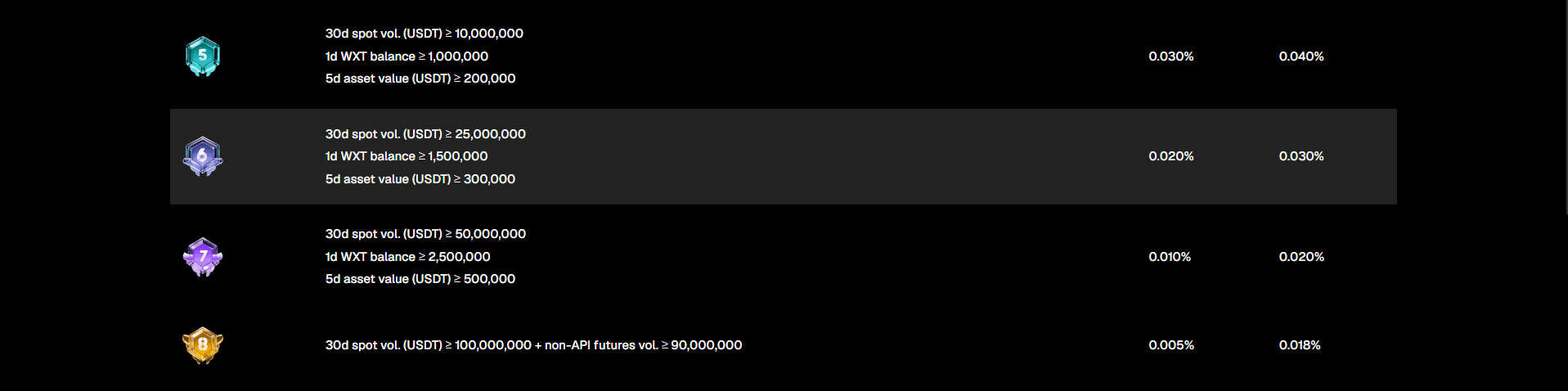
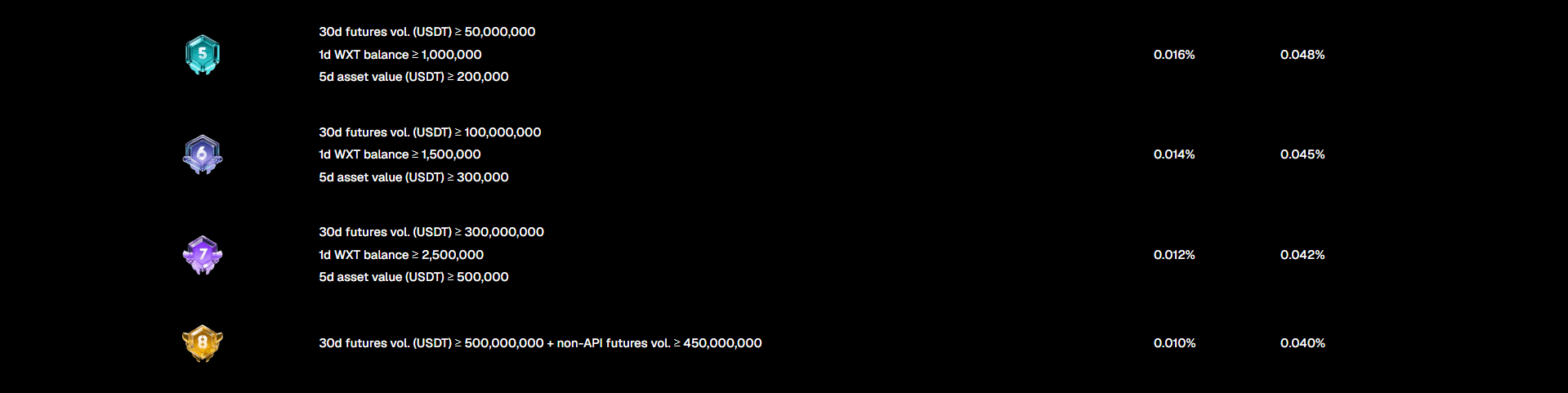
WEEX’s VIP tiers also offer varying published fee rates and benefits. Read its VIP benefits guide for the tier system. Users examining VIP 8 should additionally read the September 2026 criteria update, which announced changes to upgrade paths and directed readers to the platform for final applicable rules. VIP status does not mean a withdrawal is exempt from review.
How Does WEEX Address Security and Asset Protection?
WEEX publishes a Proof of Reserves page and a 1,000 BTC Protection Fund page. These are useful materials to inspect, but neither should be described as a guarantee that trading is risk-free or that every loss will be repaid.
To check Proof of Reserves: open the page, identify the snapshot date and assets within scope, read the relevant reserve ratio, and examine the verification method made available. A snapshot reports a defined point in time. WEEX’s reserve-verification guide explains what the published evidence can show.
To check the Protection Fund: open its FAQ and read its eligible-loss criteria, exclusions, and claim instructions. The published terms exclude ordinary trading losses. A losing futures position or a token price decline is not converted into a covered claim by the fund’s existence.
To protect your account: use the official website or app, enable the available account-security settings, and check suspicious websites or contacts through WEEX Official Verification. Do not provide a login code or transfer funds to someone who privately claims to be WEEX support.
A complete platform review should also recognize documented failures. WEEX reported an ETH/USDT trading anomaly in March 2025 and later published a compensation update for that event. These sources describe a specific operational incident and WEEX’s stated response; they do not prove that a similar issue cannot happen again.
What Do WEEX User Reviews Actually Tell You?
A WEEX review should separate product documentation, app ratings, and individual complaints. They answer different questions.
On September 28, 2026, the US Apple App Store listing displayed 4.6/5 from about 2,100 ratings. A Google Play listing displayed 4.4 from about 15,600 reviews in the version checked. These are dated, listing-specific snapshots; neither is a security audit.
At the same check, the Trustpilot profile for www.weex.com showed no available rating. Trustpilot displayed a guideline-breach warning and said fake reviews had been removed. Written complaints remain on the page. Those complaints should be read seriously, but an unresolved individual post is not enough to determine the cause of every withdrawal, trade, or support case. Do not reuse a historical Trustpilot score as though it were the profile’s current status.
To assess a review, look for the date, product, order or transfer record, account status, support response, and eventual resolution. A third-party payment issue, a blockchain confirmation delay, a security review, and a trading-system incident require different evidence. WEEX’s existing guide to interpreting user reviews gives additional context.
How Do You Contact WEEX Support About a Specific Problem?
Use the support entry point on the official WEEX website, the Help Center, or contact information you have verified independently. The official verification tool is relevant if you receive an unsolicited “customer service” or “VIP manager” message.
Prepare the details that allow the team to identify the problem:
- Deposit: asset, network, time, amount, sending transaction hash, and status.
- Withdrawal: asset, network, request time, current status, and transaction hash if one has been issued.
- Spot order: pair, order type, order ID, intended price, fills, and open-order status.
- Futures position: contract, position side, margin mode, leverage, order record, and relevant timestamps.
- Copy trade: Elite Trader, selected pair, your copy settings, corresponding order, and account record.
- WE-Launch or referral reward: the particular event or program page, its dates, enrollment or invitation record, and the reward status.
Do not send passwords, recovery phrases, or one-time verification codes. A clear order or transaction record is much more useful than a general statement that “the app did not work.”
Frequently Asked Questions About WEEX
1. How Do I Buy Crypto on WEEX?
Log in, make the required funds available, open Spot, choose the trading pair, inspect the order book, select Buy, enter the order type and amount, review the details, and submit. Then check Open Orders or Order History for the result. The spot trading guide contains a longer walkthrough.
2. Can I Trade Futures on WEEX Without Buying the Spot Asset?
Eligible users can take exposure through a futures contract rather than simply buying the spot asset. You still need the required margin and must account for fees, funding, leverage, and liquidation. The futures tutorial explains the order flow.
3. Will WEEX Copy Trading Repeat an Elite Trader’s Existing Position?
WEEX’s copier settings guide says that if the trader already has a position when you begin copying, copying starts with the next eligible position they open. Your fill and result can differ from theirs.
4. Do I Automatically Join WE-Launch by Holding WXT?
No. WEEX’s newer participation guide instructs users to select Join Now on the relevant event page and satisfy that event’s average spot-holdings and other eligibility rules.
5. Is WEEX Safe Because It Has a Protection Fund?
A fund is a specific published protection arrangement, not a guarantee against all losses. Read the fund’s scope and exclusions, inspect the latest reserve information, secure your account, and evaluate the risk of the product you intend to use.

Gainers


